
if (!"pacman" %in% rownames(installed.packages())) install.packages("pacman")

library(pacman)

pacman::p_load(bayesplot, bayestestR, DescTools, export, ggstatsplot, gt, gtsummary, haven, irr, knitr, labelled, patchwork, readxl, RNOmni, tidyverse, writexl)1 Abstract
This script demonstrates R workflows for Adaptive Choice-Based Conjoint (ACBC) analysis using a PlayStation 4 bundle study (n = 142). It derives quantile-based price breakpoints for piecewise price functions and relates them to hierarchical Bayes (HB) utilities. It analyzes post-burn-in posterior draws of the upper-level means (Alpha) to compute highest density intervals, posterior probabilities, and tests of differences in part worths, total utilities, and relative importances. Predictive validity is assessed on holdout tasks via hit rate, MAE, MedAE, RMSE, Cohen’s kappa, and mean hit probability. Two HB models are compared with exact McNemar/binomial and Wilcoxon signed-rank tests. Reusable R functions automate the validation.
2 Further Information
R analysis script presenting the examples discussed in the lecture’s slides.
Only modify (also not in part) with appropriate permission! See the license information at the end of the document.
Download the pdf version here
TipIf this grabs your attention
If this exercise grabs your attention, please check out our master study programs at the Otto von Guericke University in Magdeburg (Germany) by clicking on the logo!


Goal: students should practice analyzing data with R and RStudio. Also, one goal is to make students familiar with the functions provided by modern packages routinely used in market research tasks. These skills will serve them well in the progress of their study time and in the future. The internet provides countless further examples. Besides, there exist very good textbooks (Chapman & Feit, 2019; Field, Miles, & Field, 2012).
We also provide other example for our classes in Marketing Methods and Analysis, which is a more general course on marketing methods and data analysis (Lichters, 2024).
3 Loading packages that we will use
Note
R is a context-sensitive language. Thus, ‘data’ will be interpreted not in the same way as ‘Data’ will.
In R most functionality is provided by additional packages.
Most of the packages are well-documented, See: https://cran.r-project.org/
The code chunk below first evaluates if the package pacman (Rinker & Kurkiewicz, 2018) is already installed on your machine. If yes, the corresponding package will be loaded. If not, R will install the package (as long as the package is still maintained on the Comprehensive R Archive Network CRAN.
Alternatively, you can do this manually first by executing install.packages(“pacman”) and then library(pacman).
The second line then loads the package pacman
The third line uses the function p_load() from the pacman package to install (if necessary) and load all packages that we provide as arguments (e.g., tidyverse (Wickham et al., 2019)). This only works if all packages are still available on CRAN.
Here is the R session info, which gives you information on my machine, all loaded packages, and their version:
R version 4.6.1 (2026-06-24 ucrt)
Platform: x86_64-w64-mingw32/x64
Running under: Windows 11 x64 (build 26100)

Matrix products: default
  LAPACK version 3.12.1

locale:
[1] LC_COLLATE=German_Germany.utf8  LC_CTYPE=German_Germany.utf8
[3] LC_MONETARY=German_Germany.utf8 LC_NUMERIC=C
[5] LC_TIME=German_Germany.utf8

time zone: Europe/Berlin
tzcode source: internal

attached base packages:
[1] stats     graphics  grDevices utils     datasets  methods   base

other attached packages:
 [1] writexl_2.0.1     lubridate_1.9.5   forcats_1.0.1     stringr_1.6.0
 [5] dplyr_1.2.1       purrr_1.2.2       readr_2.2.0       tidyr_1.3.2
 [9] tibble_3.3.1      ggplot2_4.0.3     tidyverse_2.0.0   RNOmni_1.0.1.2
[13] rmarkdown_2.32    readxl_1.5.0      patchwork_1.3.2   labelled_2.16.1
[17] knitr_1.51        irr_0.85          lpSolve_5.6.23    haven_2.5.5
[21] gtsummary_2.5.1   gt_1.3.0          ggstatsplot_1.1.1 export_0.3.3
[25] DescTools_0.99.60 bayestestR_0.19.0 bayesplot_1.16.0  pacman_0.5.1

loaded via a namespace (and not attached):
 [1] gld_2.6.8               rematch2_2.1.2          sandwich_3.1-3
 [4] rlang_1.3.0             magrittr_2.0.5          multcomp_1.4-32
 [7] otel_0.2.0              e1071_1.7-17            compiler_4.6.1
[10] statsExpressions_2.1.1  systemfonts_1.3.2       vctrs_0.7.3
[13] devEMF_4.6              pkgconfig_2.0.3         fastmap_1.2.0
[16] backports_1.5.1         tzdb_0.5.0              ragg_1.5.2
[19] xfun_0.60               jsonlite_2.0.0          styler_1.11.0
[22] uuid_1.2-2              broom_1.0.13            R6_2.6.1
[25] stringi_1.8.9           RColorBrewer_1.1-3      boot_1.3-32
[28] cellranger_1.1.0        estimability_2.0.0      Rcpp_1.1.2
[31] zoo_1.9-0               parameters_0.29.3       R.utils_2.13.0
[34] correlation_0.8.8       timechange_0.4.0        splines_4.6.1
[37] Matrix_1.7-6            R.cache_0.17.0          tidyselect_1.2.1
[40] rstudioapi_0.19.0       yaml_2.3.12             codetools_0.2-20
[43] lattice_0.23-1          withr_3.0.3             S7_0.2.2
[46] flextable_0.10.1        askpass_1.2.1           coda_0.19-4.1
[49] evaluate_1.0.5          survival_3.8-11         RcppParallel_6.2.1
[52] proxy_0.4-29            zip_3.0.2               stargazer_5.2.3
[55] xml2_1.6.0              pillar_1.11.1           insight_1.5.4
[58] generics_0.1.4          paletteer_1.7.0         hms_1.1.4
[61] rstantools_2.7.1        scales_1.4.0            rootSolve_1.8.2.4
[64] xtable_1.8-8            class_7.3-24            glue_1.8.1
[67] gdtools_0.5.1           emmeans_2.0.4           lmom_3.3
[70] tools_4.6.1             data.table_1.18.4       openxlsx_4.2.8.1
[73] Exact_3.3               fs_2.1.0                mvtnorm_1.4-2
[76] grid_4.6.1              datawizard_1.3.1        cli_3.6.6
[79] textshaping_1.0.5       rvg_0.4.2               officer_0.7.6
[82] fontBitstreamVera_0.1.1 expm_1.0-1              gtable_0.3.6
[85] R.methodsS3_1.8.2       digest_0.6.39           fontquiver_0.2.1
[88] TH.data_1.1-5           htmlwidgets_1.6.4       farver_2.1.2
[91] htmltools_0.5.9         R.oo_1.27.1             lifecycle_1.0.5
[94] httr_1.4.9              fontLiberation_0.1.0    openssl_2.4.2
[97] MASS_7.3-66
4 Application 1: Finding appropriate price breakpoints for the piece-wise price function in Sawtooth Software
4.1 Import data from Excel counts analysis
Note
The Excel file named “Excel Report - CountsInclass.xlsx” needs to be placed into your RStudio project folder.
d <- readxl::read_xlsx("Excel Report - CountsInclass.xlsx", sheet = "Summed Price Frequencies")4.2 Search for break points
Below, we build a function that automates stuff for us. It takes the imported Excel file and removes all unnecessary data. Then it calculates the breakpoints for the piecewise price function based on the price distribution’s quantiles. The number of breakpoints can be defined by the user. Finally, the function returns a data frame with the breakpoints and their corresponding quantiles.
breakpoints <- function(data, breakpoints) {
  start <- which(data[, 1] == "Summed Price" & data[, 2] == "Frequency")
  end <- which(is.na(data[, 1]) & is.na(dplyr::lead(data[, 1])))

  results <- data |>
    dplyr::rename_all(.tbl = _, ~ tolower(gsub(" ", "_", as.character(data[start, ])))) |>
    dplyr::filter(!row_number() %in% c(1:start, end:nrow(data))) |>
    dplyr::mutate_all(.tbl = _, ~ as.numeric(.x)) |>
    dplyr::reframe(price = DescTools::Quantile(x = summed_price, weights = frequency, probs = seq(0, 1, (1 / (breakpoints - 1))))) |>
    dplyr::mutate(quantile = paste0(round(seq(0, 1, (1 / (breakpoints - 1))) * 100, digits = 2), "%")) |>
    dplyr::mutate_if(is.numeric, round, 2) |>
    dplyr::relocate(quantile, .before = everything()) |>
    as.data.frame()

  return(results)
}
After having established the function, we can use it below, provided that the data frame d is still in our environment. The second argument specifies the number of breakpoints we want. In this case, we want 11 breakpoints, which means we will have 10 price segments in our piecewise price function.
breakpointslist <- breakpoints(d, 11)

breakpointslist
quantile price
1 0% 207.95
2 10% 326.95
3 20% 355.95
4 30% 382.95
5 40% 409.95
6 50% 435.95
7 60% 460.95
8 70% 490.95
9 80% 525.75
10 90% 566.95
11 100% 735.954.3 Save results to excel
We can save the results in an Excel file. This facilitates using the breakpoints in Sawtooth Software, as we can simply copy and paste them from the Excel file.
writexl::write_xlsx(breakpointslist, "breakpointslist_excel.xlsx")5 Application 2: Evaluating the relationship between breakpoints and estimated hierarchical Bayes utilities when using a piecewise price function
5.1 Import HB solution with breakpoints from Excel
Below, we import the HB solution with breakpoints from an Excel file. The Excel file named “HB_constraints.xlsx” needs to be placed into your RStudio project folder. We then rename the columns of the imported data frame to “label”, “utility”, and “sd”.
5.2 Extract the relevant information
Below, we extract the relevant information from the imported data frame. We remove all rows that are not relevant for our analysis. The relevant rows are those that contain the estimated utilities for the breakpoints.
HB_Breakpoint_Utilities <- HB_Breakpoint_Utilities[-c(1:which(stringr::str_detect(HB_Breakpoint_Utilities$label, "Average Utilities")), (which(stringr::str_detect(HB_Breakpoint_Utilities$label, "Average Importances")) - 1):nrow(HB_Breakpoint_Utilities)), ]

#discard sd column
HB_Breakpoint_Utilities <- HB_Breakpoint_Utilities[, -3]

## extract only the prices and the corresponding utilities as basis for a scatterplot (i.e., delete "PRICE: "), afterwards change variables to numeric
Price_Utilities <- dplyr::filter(HB_Breakpoint_Utilities, as.integer(stringr::str_detect(HB_Breakpoint_Utilities$label, "PRICE")) == 1) %>%
  setNames(c("price", "utility")) %>%
  dplyr::mutate(price = gsub("PRICE: ", "", price)) %>%
  dplyr::mutate(dplyr::across(tidyselect::everything(), function(x) as.numeric(x)))

Price_Utilities
# A tibble: 11 × 2
price utility
<dbl> <dbl>
1 208. 88.9
2 327. 82.7
3 356. 65.8
4 383. 51.9
5 410. 39.1
6 436. 22.8
7 461. 10.8
8 491. -9.18
9 526. -45.7
10 567. -54.1
11 736. -253. 5.3 Creating a scatter plot with a line connecting the points to visualize the relationship between price and utility
5.3.1 First plot (including minimum and maximum)
plot_extremes <- Price_Utilities |> ggstatsplot::ggscatterstats(
  x = "price",
  y = "utility",
  add = "reg.line",
  conf.int = FALSE,
  cor.coef = TRUE,
  cor.method = "pearson",
  xlab = "Price",
  ylab = "Utility",
  bf.message = FALSE,
  marginal = FALSE,
  title = "Relationship utility x prices, including min and max prices",
  label.var = "price",
  point.label.args = list(
    box.padding = 1.5,     # Distance between label and point
    point.padding = 1,   # Distance between label and other points
    max.overlaps = 20,    # Maximum number of overlaps before suppressing labels
    size = 3
  )
) +
  ggplot2::geom_line(colour = "red", linewidth = 1, alpha = 0.5)


plot_extremes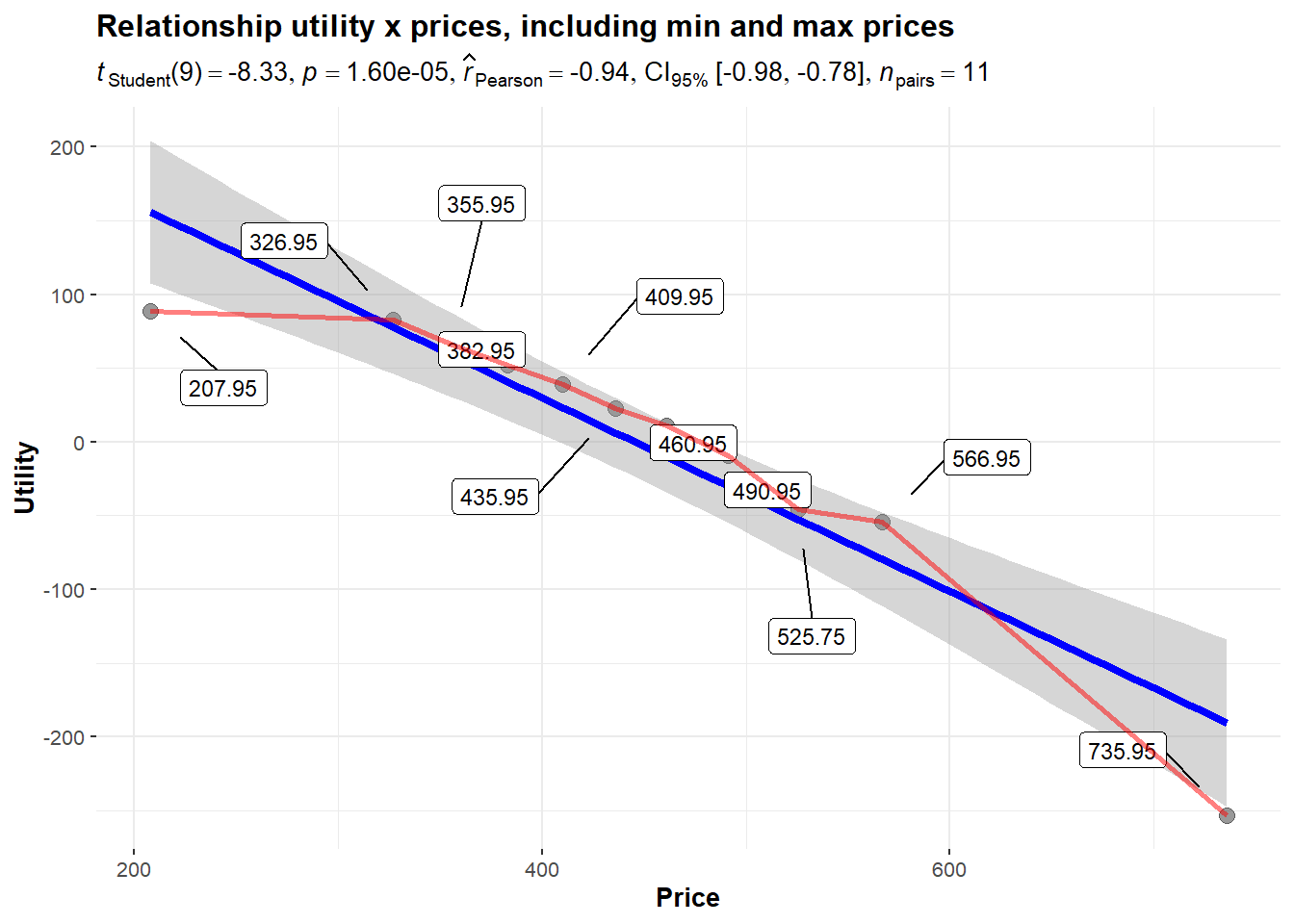
5.3.2 Second plot excluding minimum and maximum
plot_no_extremes <- Price_Utilities |>
  dplyr::filter(price != min(price) & price != max(price)) |>
  ggstatsplot::ggscatterstats(
  x = "price",
  y = "utility",
  add = "reg.line",
  conf.int = FALSE,
  cor.coef = TRUE,
  cor.method = "pearson",
  xlab = "Price",
  ylab = "Utility",
  bf.message = FALSE,
  marginal = FALSE,
  title = "Relationship utility x prices, excluding min and max prices",
  label.var = "price",
  point.label.args = list(
    box.padding = 1.5,     # Distance between label and point
    point.padding = 1,   # Distance between label and other points
    max.overlaps = 20,    # Maximum number of overlaps before suppressing labels
    size = 3
  )
  ) +
  ggplot2::geom_line(colour = "red", linewidth = 1, alpha = 0.5)

plot_no_extremes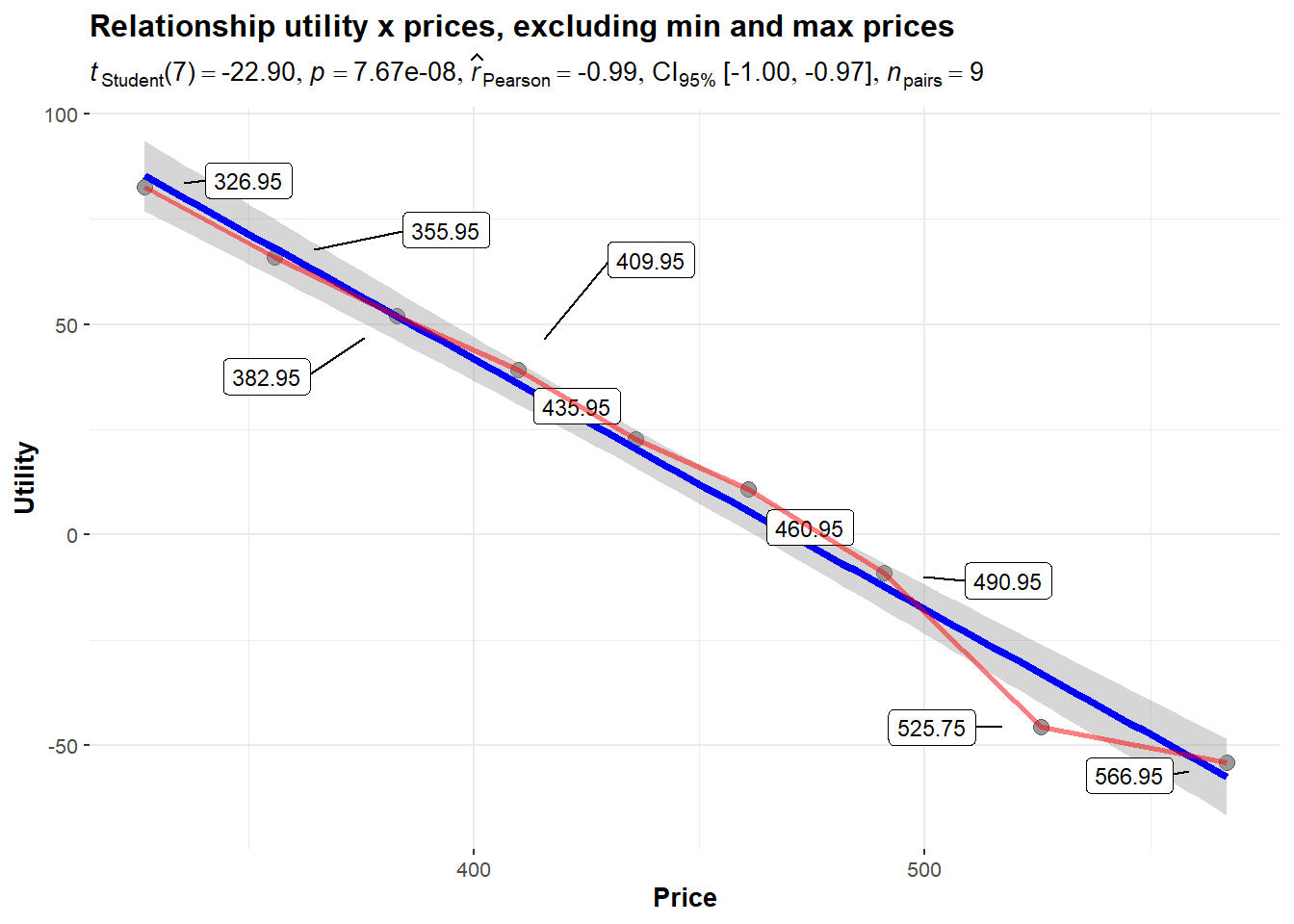
5.3.3 plot the figures side-by-side
plots <- plot_extremes + plot_no_extremes

plots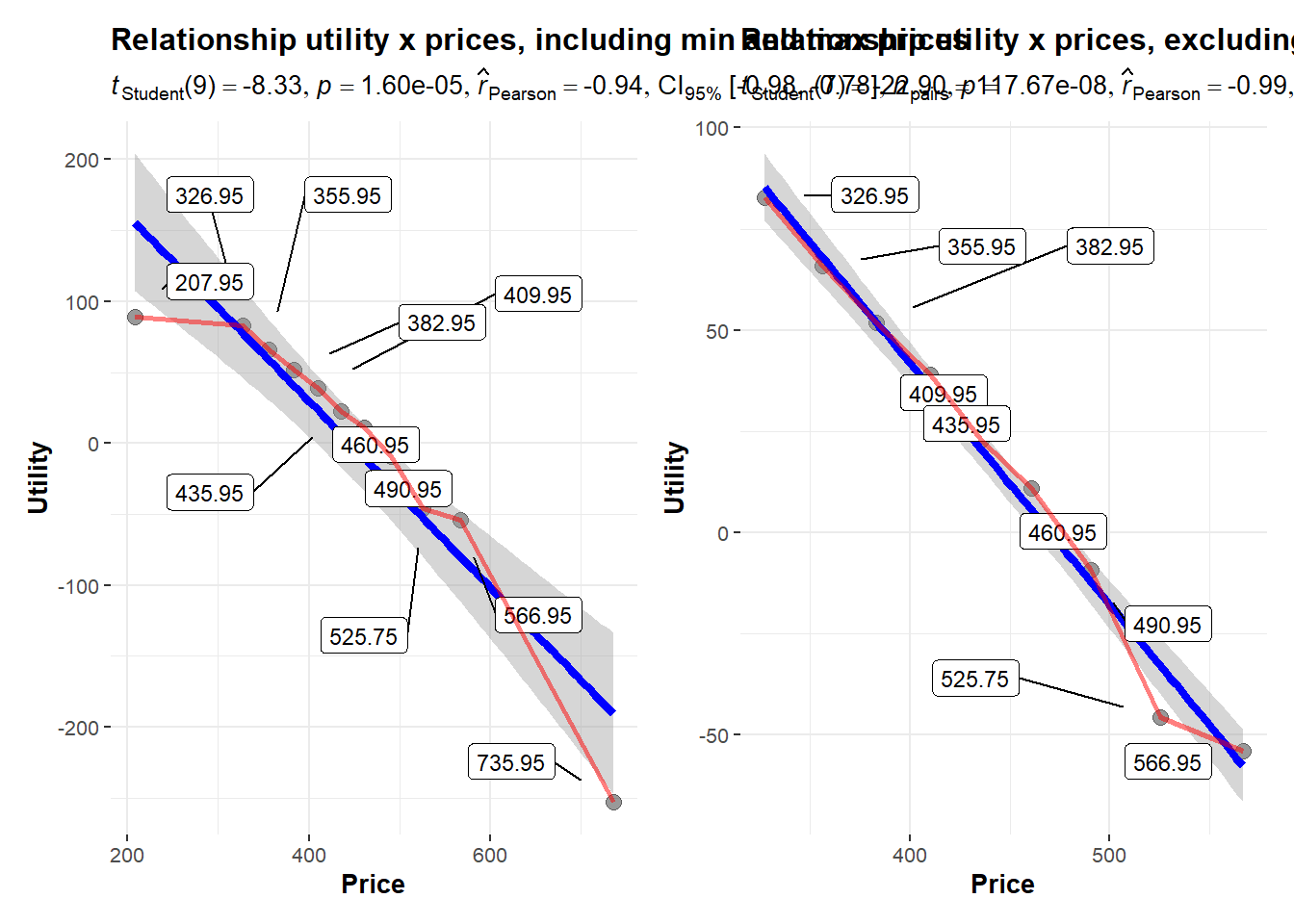
5.3.4 export the figure to a PowerPoint file
plots |>
   export::graph2office(file = "Price_Utility_Plots.pptx", width = 12, height = 7, append = FALSE, type = "PPT")
6 Application 3: Analyzing Alpha (distribution of attribute level-wise means of the participants’ utilities) after hierarchical Bayes estimation
Next, we analyze the Alpha (distribution of attribute-level-wise means of the participants’ utilities) across successive iteration steps. Estimation uses the PlayStation 4 bundle example (see Chapter 4 in the lecture).
6.1 Import the *.csv file as produced by Sawtooth Software Lighthouse Studio.
Make sure that the file ‘Playstation4_hb_alpha.csv’ (see E-Learning platform) is located at your RStudio project’s directory.
In the code chunk below, we hand in the file name as well as the arguments header, sep, and dec to the read.csv() function.
In this way, we tell the function that:
- our data file uses a header containing variable names in the first row
- data is separated by a ‘,’
- the file uses ‘.’ as decimal sign
To execute the call, just set the cursor somewhere in the corresponding code line and press ‘Ctr’+‘Enter’.
If you encounter any problems with the read functions, please try to copy your *.csv-file to the desktop and then use:
‘d_Alpha<-read.csv(file.choose(), header = TRUE, sep = ’,’, dec = ’.’)’.
This will open a dialogue that allows for a manual selection of the file.
d_Alpha <-read.csv("PlayStation4_hb_alpha.csv", header = TRUE, sep = ',', dec = '.')Now, the object d_Alpha (a dataframe) is part of our working environment. We can access the dataframe.
For Example we can view the dataframe d_Alpha via the function View(). We can also preview the first part of the data set by head()
The code below returns the first 6 cases (head()) of d_Alpha, while considering only the first 5 variables (d_Alpha[,1:5]).
head(d_Alpha[,1:5])| Iteration | X500.gigabyte | X1.terabyte | black | white |
|---|---|---|---|---|
| 1 | -0.0654039 | 0.0654039 | -0.0017922 | 0.0017922 |
| 2 | -0.0100344 | 0.0100344 | -0.0024558 | 0.0024558 |
| 3 | -0.0346806 | 0.0346806 | 0.0019213 | -0.0019213 |
| 4 | 0.0197559 | -0.0197559 | -0.0212265 | 0.0212265 |
| 5 | -0.0092769 | 0.0092769 | 0.0257134 | -0.0257134 |
| 6 | -0.0850587 | 0.0850587 | -0.0267374 | 0.0267374 |
We see that each row corresponds to a single iteration step. Keep in mind: We assume the Hastings-Algorithm has converged from step 40001 onward.
Next, allocate appropriate variable names. The following code chunk sets the names of d_Alpha (the variable names) to a vector of names we provide as strings. c() is a generic R function that combines its arguments to form a vector.
names(d_Alpha) <- c("Iteration",
                    "500_gigabyte",
                    "1_terabyte",
                    "black",
                    "white",
                    "OneDualShockController",
                    "TwoDualShockController",
                    "Access_charging_station_2_controller",
                    "Access_PS4_wireless_Stereo_Headset",
                    "Access_no_accessories",
                    "Action_Far_Cry_Primal",
                    "Action_GTA_V",
                    "Action_Life_is_strange",
                    "Action_Tom_Clancy_The_Division",
                    "Action_no_game",
                    "RPG_The_Witcher_3",
                    "RPG_Fallout_4",
                    "RPG_Final_Fantasy_X_X2",
                    "RPG_Dark_Souls_3",
                    "RPG_no_game",
                    "Family_Just_Dance_2016",
                    "Family_Guitar_Hero_Live",
                    "Family_FIFA_16",
                    "Family_no_game",
                    "price_202.3",
                    "price_775.489",
                    "NONE")
Afterward, we could see the new names of d_Alpha by calling the names() function.
names(d_Alpha) [1] "Iteration"
[2] "500_gigabyte"
[3] "1_terabyte"
[4] "black"
[5] "white"
[6] "OneDualShockController"
[7] "TwoDualShockController"
[8] "Access_charging_station_2_controller"
[9] "Access_PS4_wireless_Stereo_Headset"
[10] "Access_no_accessories"
[11] "Action_Far_Cry_Primal"
[12] "Action_GTA_V"
[13] "Action_Life_is_strange"
[14] "Action_Tom_Clancy_The_Division"
[15] "Action_no_game"
[16] "RPG_The_Witcher_3"
[17] "RPG_Fallout_4"
[18] "RPG_Final_Fantasy_X_X2"
[19] "RPG_Dark_Souls_3"
[20] "RPG_no_game"
[21] "Family_Just_Dance_2016"
[22] "Family_Guitar_Hero_Live"
[23] "Family_FIFA_16"
[24] "Family_no_game"
[25] "price_202.3"
[26] "price_775.489"
[27] "NONE" In R, we can assess the elements of a dataframe in multiple ways.
For example, we can assess the variable “500_gigabyte” by calling d_Alpha$500_gigabyte.
Alternatively, since the variable is the second one in the dataframe, we could also use d_Alpha[,2].
Analogously, we can use d_Alpha[2,] to return all variable values of the second case (row) in the dataframe d_Alpha.
In addition, we can use d_Alpha[2,2] to return the value of the second variable for the second case.
Finally, we can use d_Alpha[1:4, 2] to return the values of the second variable for the first four cases (rows) in d_Alpha.
6.2 Example 1: Highest density intervals (HDIs) for part worth utilities
You might have assumed that Bayesian tests are going to be much harder to understand than classical null hypothesis tests. This has not to be true!
Statistical testing for ACBC HB models requires a shift in mindset.
We examine the distribution of posterior Alpha draws to see if a strong majority of these draws fall on either one side or the other of the null hypothesis (Kruschke, 2015; Orme & Chrzan, 2021).
One thing market researchers are very familiar with are 95% confidence intervals of estimated parameters in regression models. Bayesian analysis of the posterior distribution of Alphas yields a similar interval, commonly referred to as a Highest-Density-Interval (HDI). The HDI indicates which points of the distribution are most credible, and which cover most of the distribution. Thus, the HDI summarizes the distribution by specifying an interval that spans most of the distribution, say 95% of it, such that every point inside the interval has higher credibility than any point outside the interval. Therefore, the term credible interval is also very common.
To develop a 95% HDI, we simply sort the 80,000 draws following the Burn-In (warm-up) stage from lowest to highest and then exclude the lowest and highest 2.5% from each tail. Put differently, we search for the 2.5% and the 97.5% quantiles. That’s all!
Let’s show how to do this in R for the part worth utility of 1 Dualshock Controller included in the PS4 bundle.
6.2.1 Throw away the first 40,000 iterations of the Burn-In (warm-up) stage
The following code chunk used the function subset() with the arguments ‘d_Alpha’ and ‘Iteration>40000’.
The subset() function selects the subset of cases in d_Alpha for which the variable ‘Iteration’ has values higher than 40,000. The resulting subset of data is then used to replace the old dataframe d_Alpha.
d_Alpha <- subset(d_Alpha, Iteration > 40000)6.2.2 Extract the 2.5% and the 97.5% quantiles as limits of the 95% HDI
Below, we use the hdi() function from the package bayestestR (Makowski, Ben-Shachar, & Lüdecke, 2019). We feed the function with 2 arguments:
- The variable of interest (d_Alpha$OneDualShockController)
- The confidence level (0.95).
bayestestR::hdi(d_Alpha$OneDualShockController, 0.95)95% HDI: [-1.22, -0.63]Interpretation: The lower limit of the 95% HDI is -1.2150202. The upper limit is -0.6317967. As the 95% HDI does not include 0, we can conclude that, at a confidence level of 95%, having only 1 instead of 2 Dualshock Controllers with the PS4 bundle significantly decreases the likelihood of being chosen1.
6.2.3 Visualization of the entire a posteriori distribution after the warm-up stage (iteration step >40,000)
We can generate a plot showing the entire a posteriori distribution of Alpha values (if you do not believe that HB draws in the upper model from a normal distribution), along with the 95% HDI limits.
A description of the syntax is given below.
Density_Plot <- ggplot(d_Alpha, aes(x = OneDualShockController)) +
  geom_density(alpha = .2, fill = "#31B404") +
  labs(title = "A posteriori density of Alpha estimates") +
  labs(x = "Part worth utilities", y = "Density") +
  geom_vline(aes(xintercept = bayestestR::hdi(OneDualShockController, 0.95)$CI_low),
    color = "red", linetype = "dashed", linewidth = 1
  ) +
  geom_vline(aes(xintercept = bayestestR::hdi(OneDualShockController, 0.95)$CI_high),
    color = "red", linetype = "dashed", linewidth = 1
  ) +
  annotate(
    geom = "text",
    x = (bayestestR::hdi(d_Alpha$OneDualShockController, 0.95)$CI_low) + 0.1, y = max(density(d_Alpha$OneDualShockController)$y), label = round(bayestestR::hdi(d_Alpha$OneDualShockController, 0.95)$CI_low, digits = 3)
  ) +
  annotate(
    geom = "text",
    x = (bayestestR::hdi(d_Alpha$OneDualShockController, 0.95)$CI_high) + 0.1, y = max(density(d_Alpha$OneDualShockController)$y), label = round(bayestestR::hdi(d_Alpha$OneDualShockController, 0.95)$CI_high, digits = 3)
  )


plot(Density_Plot)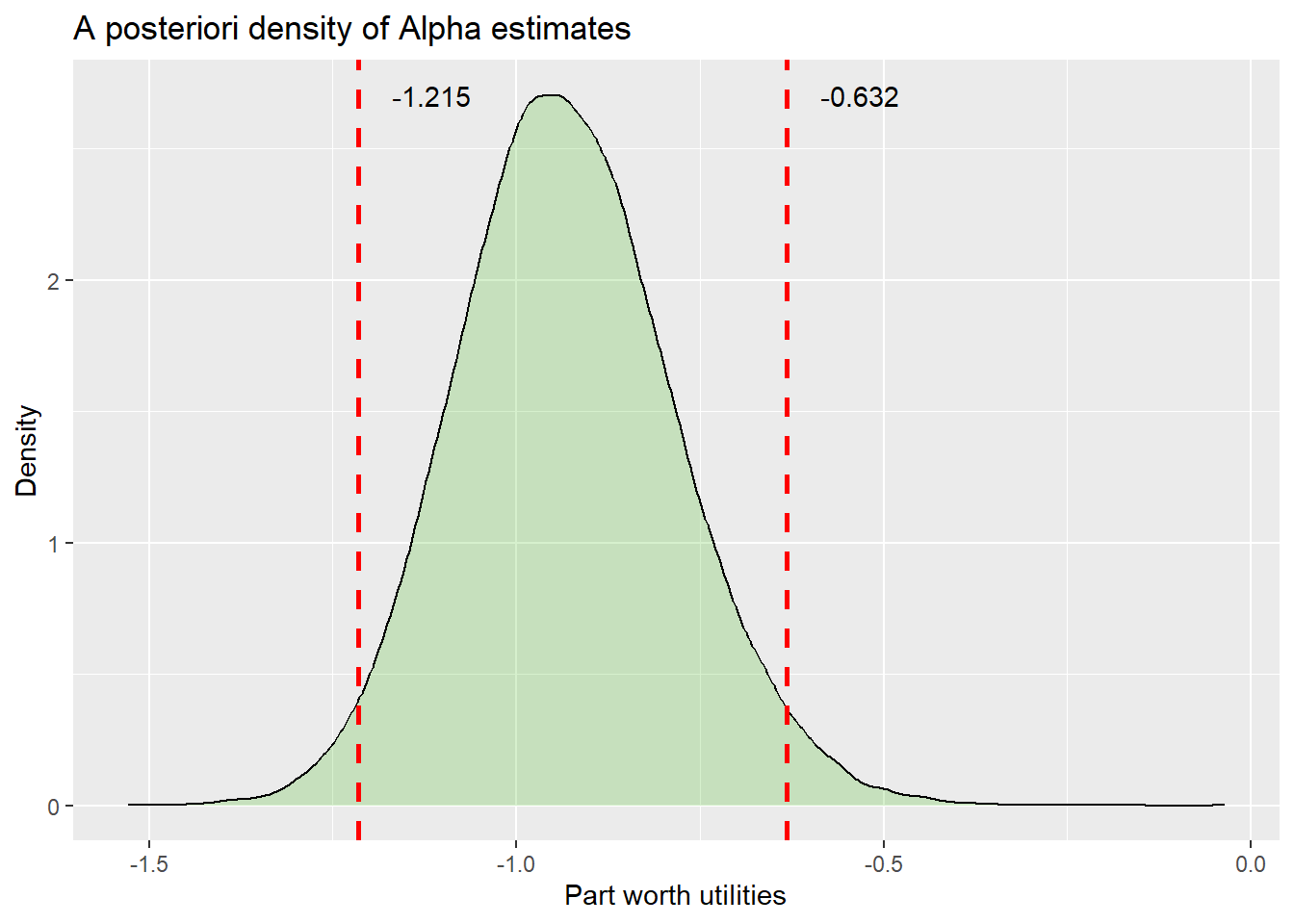
Explanation of the syntax creating the above plot: We use the package ggpolot2 (Wickham, 2016), to create a density plot of the a posteriori Alpha draws. The first line uses the ggplot() function to create a new plot named Density_Plot.
We feed the function with the dataframe d and tell it furthermore to use the variable ‘d_Alpha$OneDualShockController’ on the x-axis.
Line 2 adds the density line to the plot. The argument alpha=.2 and fill=“#FF6666” define a filling for the area under the curve that is semi-transparent (fill uses hexadecimal code for the color).
Lines 3 and 4 add a plot title and axis labels.
Lines 5 and 6 add a vertical line at the lower limit of the 95% HDI, which is red, dashed, and of size 1.
Lines 7 and 8 add an analogous line at the upper limit.
In the rest of the code, we use the annotate function to add text labels with the rounded limit values to the plot. The positions of these text labels are determined by theirx and y coordinates. We set x to the limits of the 95% HDI and add some shift to the right (+0.1), whereas we set y to the maximum of the density function in the diagram.
Whereas in the example above, we have used the ggpolot2 package to create a density plot of the posterior distribution from scratch, we next use the bayesplot package (Gabry & Mahr, 2025) to make things easier.
First, we use the bayesplot::mcmc_areas() function to recreate the density plot above. Here, the function only uses 3 arguments:
- the dataframe providing the posterior draws (d_Alpha in our case)
- pars, this argument specifies which variables (columns of d_Alpha) to use in the plot. We set pars = vars(OneDualShockController) to include the draws for the attribute level One Dual-Shock Controller
- prob, this argument defines the probability limits of the credibility interval to draw. We want a 95% HDI.
bayesplot::mcmc_areas(d_Alpha, pars = vars(OneDualShockController), prob = 0.95)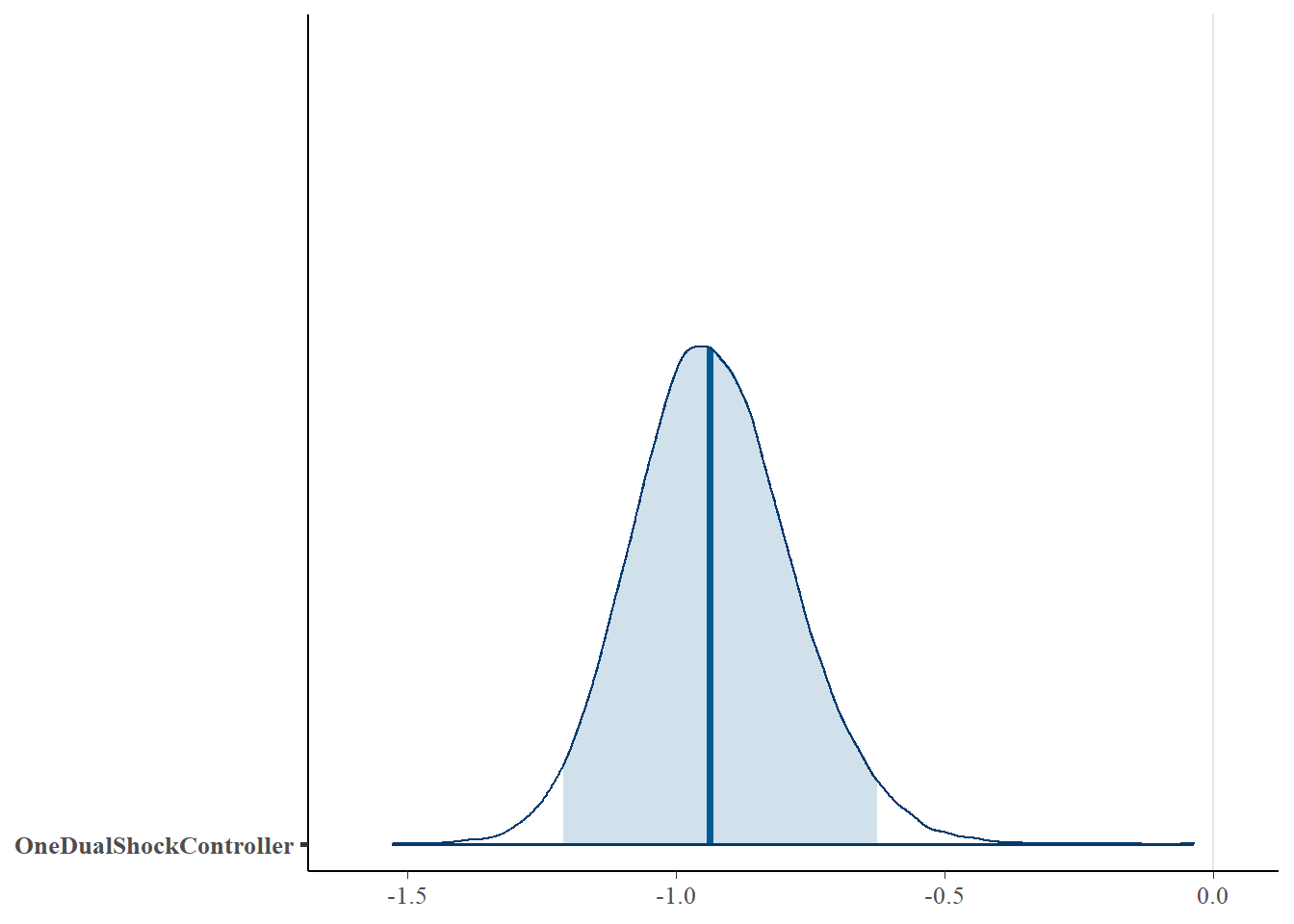
Interpretation: The bold blue vertical line constitutes the median of the distribution. The limits of the light-blue area represent the 95% HDI of the posterior draws. Similar to the approaches above, the 95% HDI does not include 0. We can conclude that, at a 95% confidence level, having only 1 Dualshock Controller instead of 2 in the PS4 bundle significantly decreases the likelihood of being chosen.
The bayesplot package also provides a function to create density plots for multiple attribute levels simultaneously, namely mcmc_areas_ridges(). In the code chunk below, we call mcmc_areas_ridges() with values for 3 of its arguments:
- the dataframe providing the posterior draws (d_Alpha)
- pars, this argument specifies which variables (columns of d_Alpha) to use in the plot. We set pars = vars(-Iteration, -NONE, -price_202.3, -price_775.489) to use all columns of d except for variables named ‘Iteration’, ‘NONE’, ‘price_202.3’, and ‘price_775.489’. For this example, we deliberately exclude the draws for the none-parameter and the two variables representing the linear price function. These draws have such extreme values that the readability of the graph for other variables would otherwise have been terrible.
- prob, this argument defines the probability limits of the credibility interval to draw. We want a 95% HDI.
Line 2-5 of the code below just add a title and a subtitle to the plot.
bayesplot::mcmc_areas_ridges(d_Alpha, pars = vars(-Iteration, -NONE, -price_202.3, -price_775.489), prob = 0.95) +
  ggplot2::labs(
    title = "Posterior distributions",
    subtitle = "with 95% HDI intervals"
  )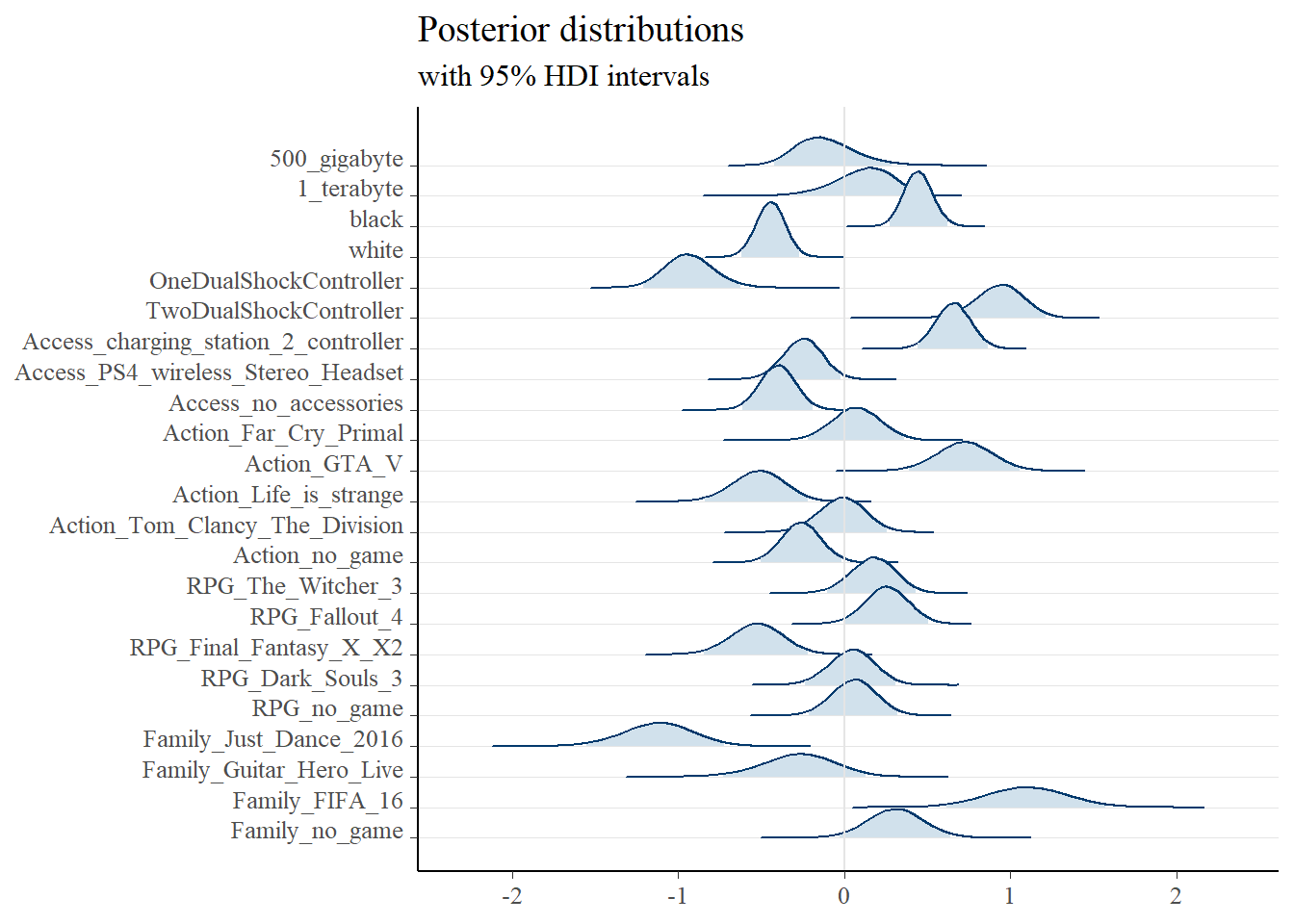
Interpretation: The plot closely mirrors information seen before, but across multiple attribute levels at once. We can see, for example, that on average, the color black significantly increases the likelihood of choosing a PlayStation 4 bundle compared to white. Conversely, differences in hard disk capacity (500GB vs. 1TB) are, on average, not significant, since the HDIs for the corresponding attribute levels are both crossing 0. Within the category of action-adventures on average (5 levels: Far Cry Primal, GTA V, Life is Strange, Tom Clancy’s The Devision, and no action-adventure), GTA V spends significantly more utility as compared to the average utility of the attribute’s levels. Furthermore, the plot is very useful for highlighting differences in the uncertainty of point estimates across attribute levels. By comparing the breadth of the density plots across different attribute levels, we have to acknowledge that point estimates for levels with a thin density are more precise than those for levelswith a broader underlying density. Thus, we can trust the point estimates for the color white more than those for Just Dance 2016. Although both attribute levels are decreasing choice likelihood, the estimates for a white color of the console are affected by less uncertainty. Uncertainty in this context can also indicate that different consumer segments are present in the sample, each with varying levels of negative utility toward Just Dance 2016.
Finally, the bayesplot package also provides a function to solely illustrate HDIs of multiple attribute levels, namely mcmc_intervals(). In the code chunk below, we call mcmc_intervals() using 4 arguments:
- the dataframe providing the posterior draws (d_Alpha)
-
pars, this argument specifies which variables (columns of d_Alpha) to use in the plot. We set pars = vars(-Iteration, -NONE, -price_202.3, -price_775.489) again.
- prob, this argument defines the probability limits of an inner credibility interval to draw. We want a 89% HDI, as often recommended in literature (Kruschke, 2015).
- prob_outer, the probability limits of an outer credibility interval to draw. We opt for 95%.
bayesplot::mcmc_intervals(d_Alpha,
                          pars = vars(-Iteration,
                                      -NONE,
                                      -price_202.3,
                                      -price_775.489),
                          prob_outer = 0.95,
                          prob = 0.89)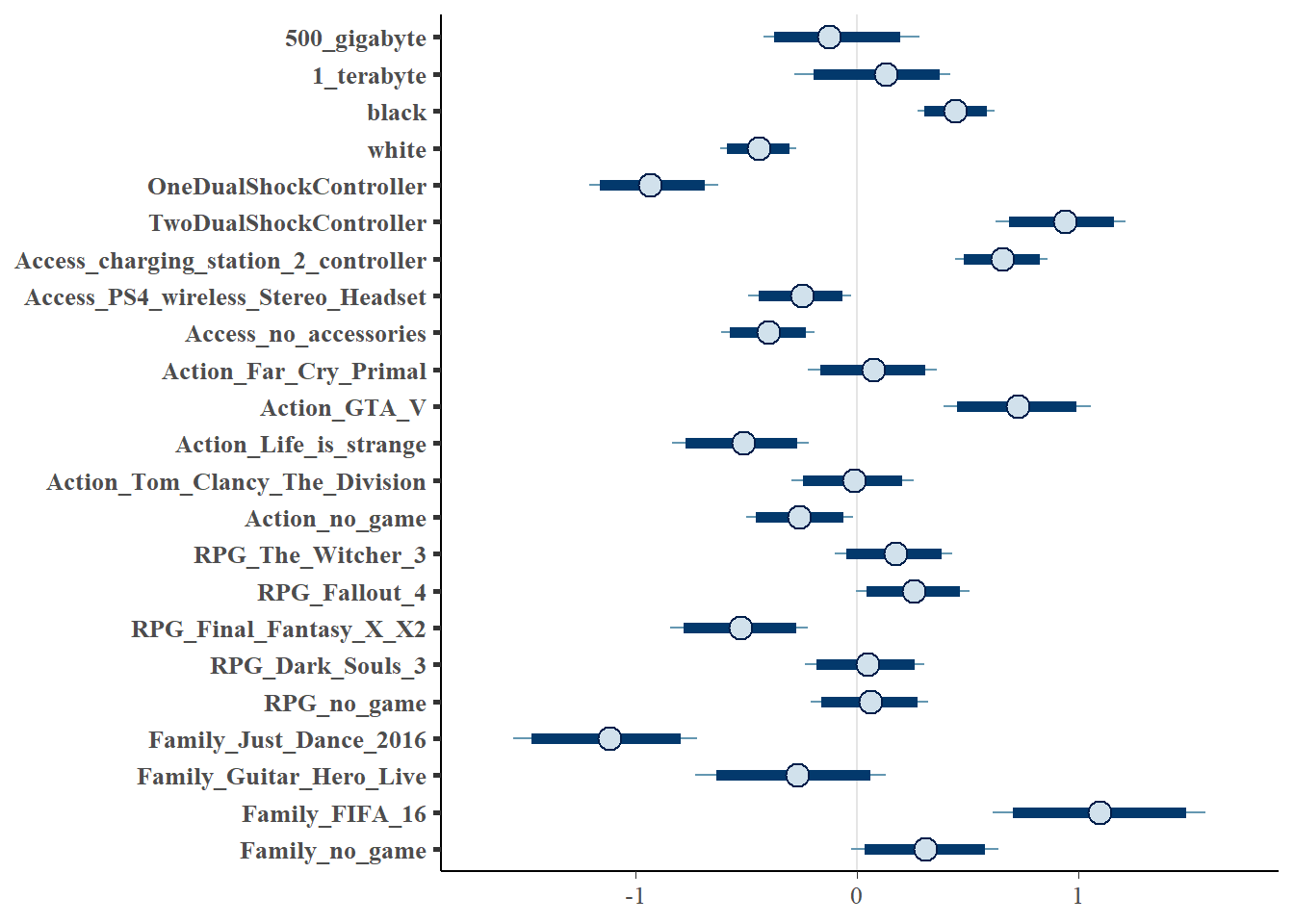
Interpretation: We can obtain the same information as before without information on the distribution of attribute levels.
6.3 Example 2: Confidence that a certain part worth utility falls below a threshold
Next, we can evaluate how many percent of the Alpha draws for a part worth utility fall below 0.
This time, we will use the part worth utility of the attribute level ‘Wireless Stereo Headset’ for the attribute ‘Accessories’ describing the PS4 bundles. This attribute also has two other levels: ‘Charging Station’ and ‘no accessories’. Thus, evaluating whether we can be very sure that the Alphas for ‘Wireless Stereo Headset’ fall below 0 means evaluating whether we can be sure that this accessory spends less utility to consumers as compared to the average utility any considered level of the attribute is doing (utilities within an attribute are zero-centered).
In the code chunk below, use the function nrow() to calculate the fraction of posterior draws that fall below 0. Here, nrow(d_Alpha[d_Alpha$Access_PS4_wireless_Stereo_Headset < 0, ]) counts the number of iterations a Alpha draw is less than 0. Dividing by nrow(d_Alpha), which gives the total number of iterations in d_Alpha, yields the fraction of draws that fall below 0.
Interpretation: We see that 98.5475% of the draws are lower than 0. Thus, we can be very sure that adding a Wireless Stereo Headset to the PS4 bundle is actually decreasing the total utility of the bundles as compared to the other options for the attribute (‘Charging Station’ and ‘no accessories’). The Bayesian p-value would correspond to 0.014525, which one might call a significant result. Keep in mind: if we test whether a certain attribute level’s utility is < 0, we are testing whether this level’s utility is lower than the average utility across all attribute levels of the corresponding attribute (utilities are mean-centered within an attribute).
6.4 Example 3: Test whether one part worth utility is different from another part worth utility within the same attribute
We can apply the same logic in order to evaluate whether, on average, the utility of one attribute level A is significantly lower than that of another level B within the same attribute (Keep in mind: We cannot compare themagnitude of raw Alpha draws across different attributes).
To do this, we just count the fraction of iterations after the Warm-up stage for which the Alpha draw of attribute level A is lower than that for attribute level B.
In this illustration, we focus on the attribute ‘Action-Adventure’. We assess if the game ‘Tom Clancy’s The Division’ spends significantly less utility as compared to the game ‘Far Cry Primal’.
[1] 65.14875Interpretation: Only in slightly more than one half of iterations the Alpha draws for ‘Tom Clancy’s The Division’ fall below those obtained for ‘Far Cry Primal’. The Bayesian p-value corresponds to 0.349. Thus, the former game can not be assumed to be significantly less preferred as compared to the latter.
6.5 Example 4: Test whether two product concepts are significantly different liked by consumers
Think back to our lecture. Just as we were able to use the individual Beta draws for each consumer to calculate the total utility of a product bundle for that consumer, we can now use the Alpha draws to calculate the total utility for an average consumer.
Again, simply counting the number of iterations after Burn-In for which the total utility of Bundle A is higher as the total utility of bundle B allows for an assessment of significant differences from a Bayesian perspective.
Imagine, we want to evaluate if A, on average, is significantly more liked than B
6.5.1 Evaluating total utilities
- A: 500GB, black, 1 Controller, charging station, no Action-Adventure, no Role-Playing, no Family & Companionship, at a price of EUR 299.99
- B: 1TB, 1 Controller, no Accessories, Far Cry Primal, Final Fantasy X/X2, no Family & Companionship at a price of EUR 349.99
The first thing we do is to calculate the total utilities across each attribute except for the price in each iteration step after the Warm-up stage. Therefore, we simply add the Alphas of the corresponding attribute levels, as shown below:
d_Alpha$Util_A_without_Price <- d_Alpha$`500_gigabyte` +
  d_Alpha$black +
  d_Alpha$OneDualShockController +
  d_Alpha$Access_charging_station_2_controller +
  d_Alpha$Action_no_game +
  d_Alpha$RPG_no_game +
  d_Alpha$Family_no_game

d_Alpha$Util_B_without_Price <- d_Alpha$`1_terabyte` +
  d_Alpha$white +
  d_Alpha$OneDualShockController +
  d_Alpha$Access_no_accessories +
  d_Alpha$Action_Far_Cry_Primal +
  d_Alpha$RPG_Final_Fantasy_X_X2 +
  d_Alpha$Family_no_game
We can now preview the first few values of the new variable:
      Util_A_without_Price Util_B_without_Price
40001         -0.097174168            -1.605879
40002         -0.228989189            -1.160884
40003         -0.174302200            -1.696067
40004         -0.591898678            -2.132527
40005          0.001082493            -2.230406
40006         -0.433196362            -1.856741
For the utility of the price of the bundle, we have to apply a linear interpolation (see slides of Chapter 2).
We use the approx() function to perform linear interpolation. We pass in 3 arguments to the function:
- x, which takes the price breakpoints for which we want to see an interpolation in between,
- y, which takes the corresponding Alpha estimates for the breakpoints, and
- xout, which specifies the point in the price dimension for which we want to achieve an estimate for the utility.
We first establish two new variables, ‘Util_A_price’ and ‘Util_B_price’, that, later on, store the interpolated utility values. The problem in our case is that we need to apply interpolation to each row of the dataframe d_Alpha.
Therefore, we use a for() loop.
‘for(i in 1:nrow(d_Alpha))’ instructs R to apply a certain command for each i in the interval [1|number of lines in d_Alpha]. The subsequent command is then applied for each line i in the dataframe d_Alpha. By using as.numeric() as a function on the result of our linear interpolation, we make sure that the new variables Util_A_price and Util_B_price in d are filled with numeric values (approx() otherwise would give a list of values as result.)
d_Alpha$Util_A_price <- 0

d_Alpha$Util_B_price <- 0


for (i in 1:nrow(d_Alpha)) {
  d_Alpha$Util_A_price[i] <- as.numeric(approx(x = c(202.3, 775.489), y = c(d_Alpha$price_202.3[i], d_Alpha$price_775.489[i]), xout = 299.99)[2])

  d_Alpha$Util_B_price[i] <- as.numeric(approx(x = c(202.3, 775.489), y = c(d_Alpha$price_202.3[i], d_Alpha$price_775.489[i]), xout = 349.99)[2])
}
Next, we build the total utility of the PS4 bundles A and B, by adding up the utilities without price and the utility of the price of A and B.
d_Alpha$Total_Utility_A <- d_Alpha$Util_A_without_Price + d_Alpha$Util_A_price

d_Alpha$Total_Utility_B <- d_Alpha$Util_B_without_Price + d_Alpha$Util_B_price
Finally, we evaluatewhether bundle A, on average, is significantly more liked than bundle B, by counting the iterations for which the total utility of bundle A is higher than the utility of bundle B.
Interpretation: Across all of the iterations, the Alpha-based estimates for the mean total utility of the PS4 bundle A are higher than those obtained for bundle B. The Bayesian p-value corresponds to 0, a significant difference.
6.5.2 Visualizing the results
A description of the syntax is given below. We see, that the posterior distributions are nearly non-overlapping highlighting the significant differences in mean total utilities for A and B.
Density_Plot <- ggplot(d_Alpha) +
  geom_density(aes(x = Total_Utility_A), alpha = .2, fill = "#31B404") +
  geom_density(aes(x = Total_Utility_B), alpha = .2, fill = "#FFBF00") +
  labs(title = "A posteriori density of Total utility estimates for A and B") +
  labs(x = "Part worth utilities", y = "Density") +
  geom_vline(aes(xintercept = bayestestR::hdi(d_Alpha$Total_Utility_A, 0.95)$CI_low),
    color = "black", linetype = "dashed", linewidth = 0.7
  ) +
  geom_vline(aes(xintercept = bayestestR::hdi(d_Alpha$Total_Utility_A, 0.95)$CI_high),
    color = "black", linetype = "dashed", linewidth = 0.7
  ) +
  geom_vline(aes(xintercept = bayestestR::hdi(d_Alpha$Total_Utility_B, 0.95)$CI_low),
    color = "red", linetype = "longdash", linewidth = 0.7
  ) +
  geom_vline(aes(xintercept = bayestestR::hdi(d_Alpha$Total_Utility_B, 0.95)$CI_high),
    color = "red", linetype = "longdash", linewidth = 0.7
  ) +
  annotate(
    geom = "text",
    x = (bayestestR::hdi(d_Alpha$Total_Utility_A, 0.95)$CI_low) + 0.6, y = max(density(d_Alpha$Total_Utility_A)$y), label = round(bayestestR::hdi(d_Alpha$Total_Utility_A, 0.95)$CI_low, digits = 2)
  ) +
  annotate(
    geom = "text",
    x = (bayestestR::hdi(d_Alpha$Total_Utility_A, 0.95)$CI_high) + 0.6, y = max(density(d_Alpha$Total_Utility_A)$y), label = round(bayestestR::hdi(d_Alpha$Total_Utility_A, 0.95)$CI_high, digits = 2)
  ) +
  annotate(
    geom = "text",
    x = (bayestestR::hdi(d_Alpha$Total_Utility_B, 0.95)$CI_low) + 0.6, y = max(density(d_Alpha$Total_Utility_B)$y), label = round(bayestestR::hdi(d_Alpha$Total_Utility_B, 0.95)$CI_low, digits = 2)
  ) +
  annotate(
    geom = "text",
    x = (bayestestR::hdi(d_Alpha$Total_Utility_B, 0.95)$CI_high) + 0.6, y = max(density(d_Alpha$Total_Utility_B)$y), label = round(bayestestR::hdi(d_Alpha$Total_Utility_B, 0.95)$CI_high, digits = 2)
  ) +
  annotate(
    geom = "text",
    x = median(d_Alpha$Total_Utility_A), y = max(density(d_Alpha$Total_Utility_A)$y) / 7, label = "A"
  ) +
  annotate(
    geom = "text",
    x = median(d_Alpha$Total_Utility_B), y = max(density(d_Alpha$Total_Utility_B)$y) / 7, label = "B"
  )


plot(Density_Plot)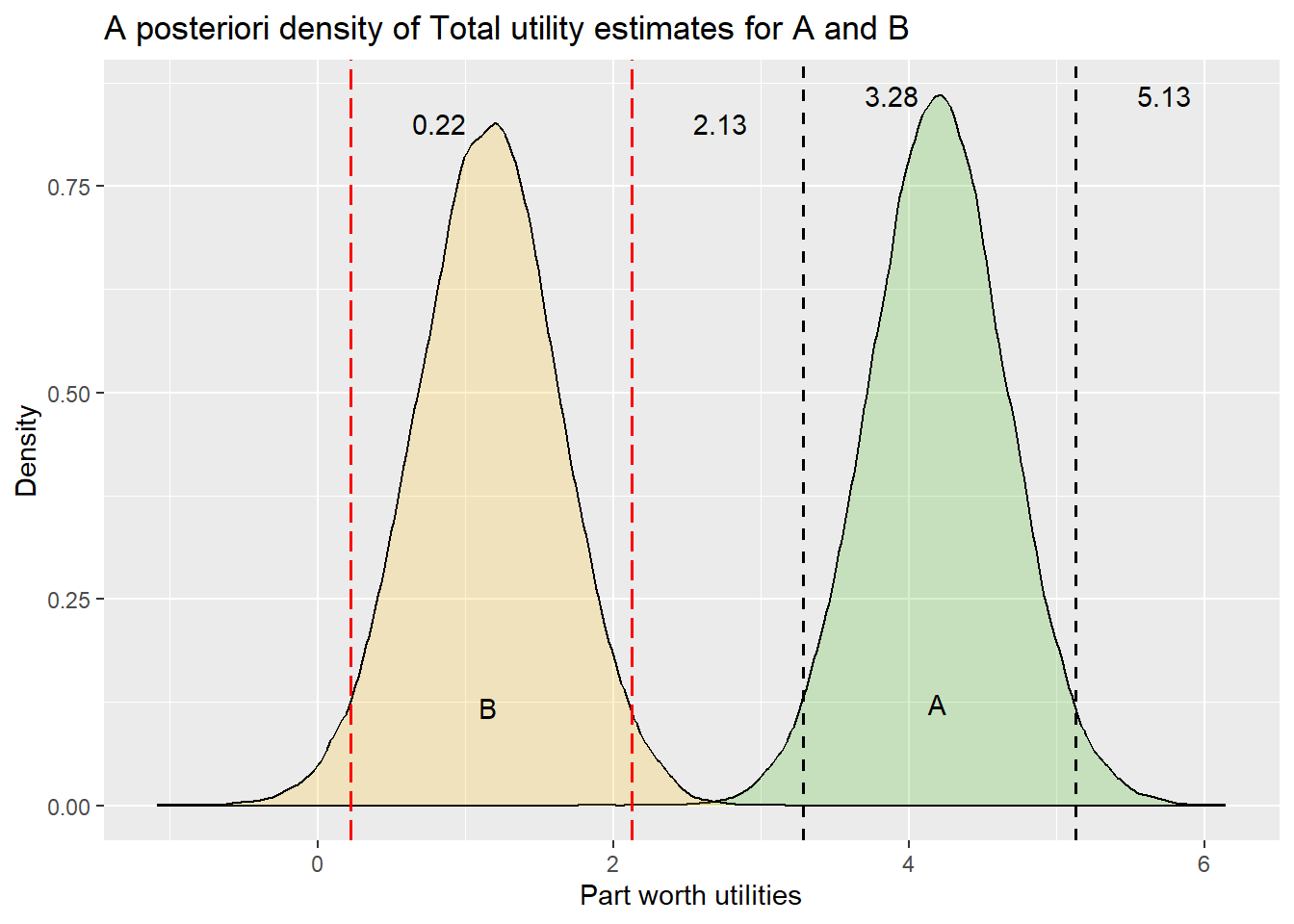
Explanation of the syntax creating the above plot: The syntax is pretty much the same as for the figure in Example 1. However, we have to add some elements twice, as we are now plotting the values of two variables simultaneously. At the end of the chunk, we added a new text label at the mean of each bundle’s distribution.
For the interval plots we can use instead:
d_Alpha |>
bayesplot::mcmc_intervals(pars = vars(Total_Utility_A, Total_Utility_B),
                          prob_outer = 0.95,
                          prob = 0.89)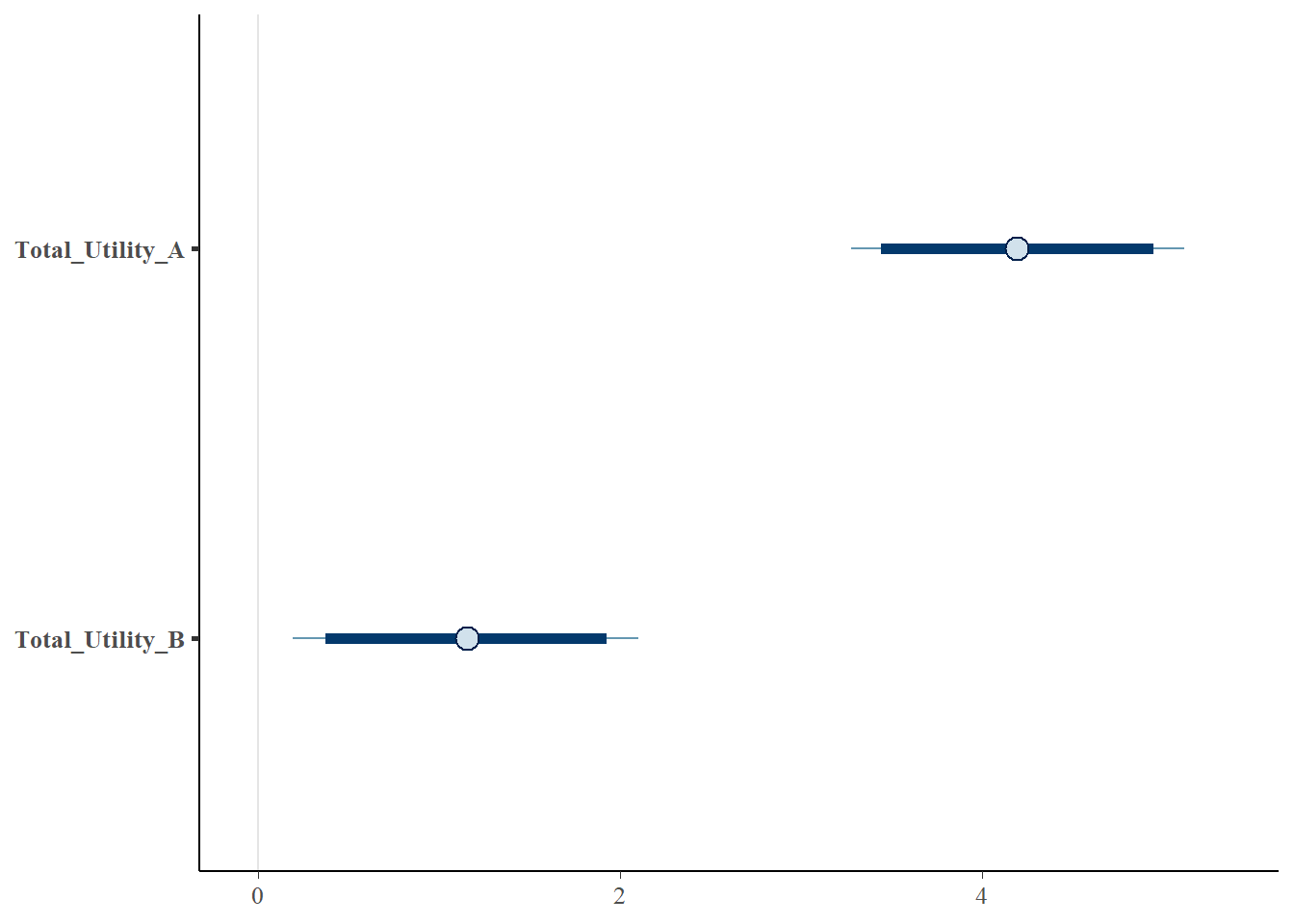
6.6 Example 5: Test whether two attributes are significantly different in terms of their relative importance
Only valid interpretation if no interaction terms are involved (main effects-only model).
Below, we want to evaluate whether the attributes, number of controllers and color, differ significantlyin terms of their relative importance.
The relative importance of an attribute is calculated by dividing the range of part worth utilities for the attribute (i.e., the difference between the highest and lowest part worth utility for the attribute) by the sum of all attributes’ ranges. Thus, we first have to calculate the range of part-worth utilities for each attribute at each iteration step after Burn-In. Then, we can calculate the relative importance of each attribute in each iteration step. Finally, we can evaluate whether the relative importance of one attribute is significantly higher (lower) than that of another attribute by counting the iterations for which this is the case.
6.6.1 Calculate the range of part worth utilities for each attribute in each iteration step after Burn-In
d_Alpha$Range_Controllers <- (d_Alpha$OneDualShockController - d_Alpha$TwoDualShockController) |> abs()

d_Alpha$Range_Color <- (d_Alpha$black - d_Alpha$white) |> abs()

d_Alpha$Range_Hard_Disk_Capacity <- (d_Alpha$`500_gigabyte` - d_Alpha$`1_terabyte`) |> abs()

d_Alpha$Range_Accessories <- pmax(
  d_Alpha$Access_charging_station_2_controller,
  d_Alpha$Access_PS4_wireless_Stereo_Headset,
  d_Alpha$Access_no_accessories
) -
  pmin(d_Alpha$Access_charging_station_2_controller,
       d_Alpha$Access_PS4_wireless_Stereo_Headset,
       d_Alpha$Access_no_accessories)


d_Alpha$Range_Action_Adventure <- pmax(
  d_Alpha$Action_Far_Cry_Primal,
  d_Alpha$Action_GTA_V,
  d_Alpha$Action_Life,
  d_Alpha$Action_Tom_Clancy_The_Division,
  d_Alpha$Action_no_game
) -
  pmin(
    d_Alpha$Action_Far_Cry_Primal,
    d_Alpha$Action_GTA_V,
    d_Alpha$Action_Life,
    d_Alpha$Action_Tom_Clancy_The_Division,
    d_Alpha$Action_no_game
  )


d_Alpha$Range_RPG <- pmax(d_Alpha$RPG_The_Witcher_3,
                          d_Alpha$RPG_Fallout_4,
                          d_Alpha$RPG_Final_Fantasy_X_X2,
                          d_Alpha$RPG_Dark_Souls_3,
                          d_Alpha$RPG_no_game) -
  pmin(d_Alpha$RPG_The_Witcher_3,
       d_Alpha$RPG_Fallout_4,
       d_Alpha$RPG_Final_Fantasy_X_X2,
       d_Alpha$RPG_Dark_Souls_3,
       d_Alpha$RPG_no_game)


d_Alpha$Range_Family <- pmax(
  d_Alpha$Family_Just_Dance_2016,
  d_Alpha$Family_Guitar_Hero_Live,
  d_Alpha$Family_FIFA_16,
  d_Alpha$Family_no_game
) -
  pmin(
    d_Alpha$Family_Just_Dance_2016,
    d_Alpha$Family_Guitar_Hero_Live,
    d_Alpha$Family_FIFA_16,
    d_Alpha$Family_no_game
  )


d_Alpha$Range_Price <- (d_Alpha$price_202.3 - d_Alpha$price_775.489) |> abs()
6.6.2 Calculate the relative importance for the two attributes in each iteration step
d_Alpha$Rel_Imp_Controllers <- d_Alpha$Range_Controllers / (d_Alpha$Range_Controllers + d_Alpha$Range_Color + d_Alpha$Range_Hard_Disk_Capacity + d_Alpha$Range_Accessories + d_Alpha$Range_Action_Adventure + d_Alpha$Range_RPG + d_Alpha$Range_Family + d_Alpha$Range_Price)

d_Alpha$Rel_Imp_Color <- d_Alpha$Range_Color / (d_Alpha$Range_Controllers + d_Alpha$Range_Color + d_Alpha$Range_Hard_Disk_Capacity + d_Alpha$Range_Accessories + d_Alpha$Range_Action_Adventure + d_Alpha$Range_RPG + d_Alpha$Range_Family + d_Alpha$Range_Price)
6.6.3 Evaluate whether the relative importance of the controller attribute is significantly higher than that of the color attribute by counting the iterations for which this is the case
[1] 99.765Interpretation: In 99.765% of the iterations, the relative importance of the controller attribute is higher than that of the color attribute. The Bayesian p-value corresponds to 0.00235, a significant difference. Thus, we can conclude that the number of controllers is significantly more important to consumers than the console’s color.
WarningWarning
In the last example above, we calculated everything (the ranges and relative importance) from the upper HB model’s Alpha draws. Thus, we have not accounted for the uncertainty in the Beta draws for individual consumers (e.g., some consumers may still prefer to buy one controller rather than two). This is a common approach in practice, but it is important to be aware of this simplification. To fully account for uncertainty in both Alphas and Betas, one would need to calculate the relative importance for each consumer and each iteration step after Burn-In, and then determine whether one attribute is more important than the other for each consumer and iteration step. This would be computationally more intensive, but it would provide a more comprehensive assessment of the differences.
Also, keep in mind: The relative importance of an attribute strongly depends on which attribute levels were included in the conjoint study.
7 Application 4: Validating the predictive validity based on holdout tasks
This application illustrates how to validate the predictive validity of a calibrated utility model based on holdout tasks. Remember from lecture that it is quite useful to include a holdout task in your (A)CBC. We will calculate each metric we discussed during class:
- The Hitrate: How many consumers did actually decide for the product that is predicted to be their most preferred product within the HOT (e.g., Ding, Grewal, & Liechty, 2005; Dong, Ding, & Huber, 2010; Schramm, 2025). It is calculated as the fraction of correctly predicted consumers.
- Mean Absolute Error (MAE) and Root-Mean-Squared-Error (RMSE) as indication of the the predictive performance at an aggregated level (e.g., Sablotny-Wackershauser, Lichters, Guhl, Bengart, & Vogt, 2024; Liu & Tang, 2015) In addition, we will also calculate the Median Absolute Error (MedAE), which is less affected by outliers (Schramm, Lichters, & Guhl, 2025).
- Cohen’s kappa (e.g., Cohen, 1968; Landis & Koch, 1977)
- The Mean Hit Probability (MHP): The mean predicted choice probability of the actually chosen option (Sablotny-Wackershauser et al., 2024; Voleti, Srinivasan, & Ghosh, 2017)
Subsequently, we use lecture example including n=142 respondents in an ACBC on PlayStation 4 bundles. This study included a holdout task named HOT1, comprising 12 options and a no-choice (none) option. The HB estimation was run in Sawtooth Software Lighthouse Studio. Within this software, choose a simulation method for your market simulation (e.g., Share of Preference, or Randomized First Choice rule). Make sure to check Individual Results
when running the simulation and afterwards store the results in your working directory. Make sure that you enter the options in your validation task in the exact same order as in your select question during the survey conduct. Otherwise your results will be messed up.
The holdout task HOT1 was specified as follows:
| Attribute | 1 | 2 | 3 | 4 | 5 | 6 | 7 | 8 | 9 | 10 | 11 | 12 |
| Harddisk | 1TB | 500GB | 500GB | 500GB | 1TB | 500GB | 1TB | 1TB | 1TB | 500GB | 1TB | 500GB |
| Color | White | White | White | White | Black | Black | White | White | Black | Black | Black | Black |
| Controllers | 1 | 2 | 1 | 2 | 2 | 1 | 1 | 2 | 2 | 1 | 1 | 2 |
| Accessories | charge station | charge station | charge station | No | Wireless headset | Wireless headset | No | No | charge station | No | Wireless headset | Wireless headset |
| Action-Adventure | Life is Strange | Far Cry Primal | Tom Clancy’s | No | Far Cry Primal | GTA V | Life is Strange | GTA V | Tom Clancy’s | Far Cry Primal | Tom Clancy’s | No |
| Role-Playing | Final Fantasy | Fallout 4 | Dark Souls 3 | No | No | Fallout 4 | Witcher 3 | Fallout 4 | Witcher 3 | Final Fantasy | Dark Souls 3 | Witcher 3 |
| Family & Companionship | FIFA 16 | FIFA 16 | FIFA 16 | Just Dance 16 | Guitar Hero Live | Just Dance 16 | Guitar Hero Live | No | Just Dance 16 | FIFA 16 | No | No |
| Price | 427.65 | 450.5 | 437.49 | 346.28 | 511.5 | 451.04 | 428.48 | 417.49 | 498.75 | 387.04 | 482.06 | 418.86 |
Note
The Excel files named “Simulation Report_HOT1.xlsx” and “RawExport.xlsx” need to be placed into your RStudio project folder.
7.1 Data import and wrangling
We first import the data for the individual market simulations results. Below we us the corresponding function read_xlsx() out of the readxl package (Wickham & Bryan, 2025). Here, skip = 1 tells the function to not import the first row of the Excel, which is empty.
HOT1_simulation <- readxl::read_xlsx("Simulation Report_HOT1.xlsx", sheet = "HOT1 | Individual Results", skip = 1)

HOT1_simulation
# A tibble: 142 × 14
ID option_1 option_2 option_3 option_4 option_5 option_6 option_7 option_8
<chr> <dbl> <dbl> <dbl> <dbl> <dbl> <dbl> <dbl> <dbl>
1 1 0 0 0.000377 0.0230 0.0138 0.0174 0.0949 0.0202
2 2 0.0936 0.00321 0 0 0.00887 0 0.00113 0.0289
3 14 0.395 0.0685 0.000189 0.0117 0.0117 0 0.152 0.00189
4 15 0.0111 0 0.000377 0.478 0 0.00113 0.00396 0
5 17 0 0.735 0.101 0 0 0 0 0.0132
6 18 0 0.459 0.0664 0 0 0 0 0.0275
7 19 0 0.0772 0.173 0 0.000377 0 0 0.143
8 27 0.000189 0 0 0 0.00132 0 0 0.0494
9 28 0 0.0128 0.0660 0 0 0 0 0.268
10 29 0 0.187 0.00113 0 0.00132 0 0 0.000755
# ℹ 132 more rows
# ℹ 5 more variables: option_9 <dbl>, option_10 <dbl>, option_11 <dbl>,
# option_12 <dbl>, None <dbl>In the imported data set we see that the first column houses the respondent IDs, whereas the remaining columns list the predicted choice probabilities for the 12 option + the none option.
Next we will transform the numbers into the scale of percentages.
HOT1_simulation <- cbind(ID = HOT1_simulation[,1],
                         HOT1_simulation[,2:ncol(HOT1_simulation)]*100) |>
                          tibble::tibble()

HOT1_simulation$ID <- as.numeric(HOT1_simulation$ID)

HOT1_simulation
# A tibble: 142 × 14
ID option_1 option_2 option_3 option_4 option_5 option_6 option_7 option_8
<dbl> <dbl> <dbl> <dbl> <dbl> <dbl> <dbl> <dbl> <dbl>
1 1 0 0 0.0377 2.30 1.38 1.74 9.49 2.02
2 2 9.36 0.321 0 0 0.887 0 0.113 2.89
3 14 39.5 6.85 0.0189 1.17 1.17 0 15.2 0.189
4 15 1.11 0 0.0377 47.8 0 0.113 0.396 0
5 17 0 73.5 10.1 0 0 0 0 1.32
6 18 0 45.9 6.64 0 0 0 0 2.75
7 19 0 7.72 17.3 0 0.0377 0 0 14.3
8 27 0.0189 0 0 0 0.132 0 0 4.94
9 28 0 1.28 6.60 0 0 0 0 26.8
10 29 0 18.7 0.113 0 0.132 0 0 0.0755
# ℹ 132 more rows
# ℹ 5 more variables: option_9 <dbl>, option_10 <dbl>, option_11 <dbl>,
# option_12 <dbl>, None <dbl>After that, we import the actual choice of the respondents for the options in the holdout task HOT1 (we have exported them as a csv file).
# A tibble: 142 × 2
      ID  HOT1
   <int> <int>
 1     1    13
 2     2    13
 3    14     5
 4    15    13
 5    17     2
 6    18    12
 7    19    13
 8    27    11
 9    28    12
10    29    13
# ℹ 132 more rows
We see that the imported data has two variables. One for the respondent IDs and a second, which stores the number of the actual chosen option (13 indicates the no choice option).
Next, we merge both sources of information. We will create a new tibble named HOT_complete which contains the simulation results plus on variable containing the actual choices with the help of the right_join() function of dplyr (Wickham, François, Henry, Müller, & Vaughan, 2026).
HOT_complete <- dplyr::right_join(HOT1_simulation,
                                   HOT1_choices,
                                   by = "ID")

#look at just a few variables
HOT_complete |>
  dplyr::select(ID, option_11, option_12, None, HOT1)
# A tibble: 142 × 5
ID option_11 option_12 None HOT1
<dbl> <dbl> <dbl> <dbl> <int>
1 1 5.40 13.3 15.4 13
2 2 0.0755 0.0566 85.7 13
3 14 0.113 0.943 7.47 5
4 15 0 0.0566 44.4 13
5 17 0.208 3.58 4.42 2
6 18 10.5 31.3 2.62 12
7 19 2.49 26.1 31.3 13
8 27 70.5 20.7 3.75 11
9 28 23.1 10.0 31.8 12
10 29 0.0189 13.4 56.2 13
# ℹ 132 more rows7.2 Doing the holdout task validation
We will focus on the validation metrics we have discussed during our seminar.
7.2.1 Hit Rate
Let us first calculate the hit rate.
This is straightforward. To do so, we need to check which choice is predicted.
The code below determines the highest predicted choice probability among the alternatives. The number of that alternative is written to variable named predicted_choice.
# A tibble: 142 × 3
      ID  HOT1 predicted_choice
   <dbl> <int>            <int>
 1     1    13                9
 2     2    13               13
 3    14     5                1
 4    15    13                4
 5    17     2                2
 6    18    12                2
 7    19    13               13
 8    27    11               11
 9    28    12               13
10    29    13               13
# ℹ 132 more rows
Next, we count the number of times the actual choice equals the predicted choice and afterwards multiplies the result with 100. Finally, we round to 4 digits.
# A tibble: 1 × 1
  hitrate
    <dbl>
1    39.4
To evaluate whether the hit rate is significantly better than chance level, we can use the binom.test() function. To do so, we first calculate the number of correctly predicted choices and store the results in number_correct.
Next, we can run the binom.test() function, for which we need to provide the number of successes x (we calculated it above; in our case), the number of trials n, which is equivalent to the number of participants (we can use the nrow(HOT_data) function to find out), and finally the chance level, 0.077. We get the chance level by dividing 1 by the number of alternatives in the holdout task.
binom.test(
  x = number_correct,
  n = nrow(HOT_data),
  p = 1 / (ncol(HOT_data) - 3)
)
    Exact binomial test

data:  number_correct and nrow(HOT_data)
number of successes = 56, number of trials = 142, p-value < 2.2e-16
alternative hypothesis: true probability of success is not equal to 0.07692308
95 percent confidence interval:
 0.3134501 0.4797854
sample estimates:
probability of success
             0.3943662
Interpretation: We see that that the hit rate is significantly higher than chance level since the p-value is less than 0.05.
7.2.2 Mean Absolute Error
Next, we calculate the mean absolute error (MAE) of prediction. This time, we must do some more data wrangling Remember, we need the observed share and the actual share for each option available in the HOT. We can easily do this in one function and moreover, we use the momentum, to learn something about loops in R. We first create an empty tibble, which we call mae, with 3 columns (option, prediced_share & observed_share).
mae <- tibble::tibble(option = NA, prediced_share = NA, observed_share = NA)We first calculate the mean predicted choice probability for each alternative in the HOT. This is our predicted share and we store the results in prediced_share. Then, we need to calculate the observed share, which is simply the number of times each alternative got chosen in the holdout task (HOT1).
The alternatives are represented as the columns 2 through 13 with their respected choice likelihoods, while the observed choices are coded 1 through 13 in the variable HOT1.
Below, we set k, an arbitrary index, to takes the value 2 to 13. Next, the loop starts. First, we store the alternative we are looking it and store the result in option. Remember that to get option 1, column, we need to subtract 2 from k since k started at 3. Each time, we calculate the mean and store the results in prediced_share. This time we refer to the column index of HOT_data, this is why we set HOT_data[, k]. Finally, we calculate the observed share and store the results in observed_share. We simply count the number of times the actual alternative got chosen in the holdout task and calculate the percentage by dividing through the total number of participants (nrow(HOT_data)) and multiply it by 100.
Lets have a look at the results:
mae# A tibble: 13 × 3
option prediced_share observed_share
<dbl> <dbl> <dbl>
1 1 3.82 4.93
2 2 11.8 7.75
3 3 3.65 2.82
4 4 10.2 2.82
5 5 5.00 3.52
6 6 0.861 2.11
7 7 1.87 0
8 8 13.2 9.86
9 9 5.20 7.75
10 10 4.32 3.52
11 11 3.75 2.11
12 12 5.14 3.52
13 13 31.2 49.3 To find the MAE, we simply calculate the absolute difference between the predicted and observed share for each alternative and then calculate the mean of these differences.
# A tibble: 1 × 1
    MAE
  <dbl>
1  3.55
Note
Thus, the mean absolute error of our predictions is 3.5463 percentage points.
Sometimes your client wishes to know which option is predicted better or worse than others. It is easiest to show this graphically. This is what we will do next.
In the code chunk below, we change the data’s format of mae from a wise layout format to long format (pivot_longer()). We specify the columns (we use all columns except for the option column).
mae_stacked <- mae |>
  tidyr::pivot_longer(data = _,
               cols = -option,
               names_to = "predicted_vs_observed",
               values_to = "share")
Let us look at the results:
mae_stacked# A tibble: 26 × 3
option predicted_vs_observed share
<dbl> <chr> <dbl>
1 1 prediced_share 3.82
2 1 observed_share 4.93
3 2 prediced_share 11.8
4 2 observed_share 7.75
5 3 prediced_share 3.65
6 3 observed_share 2.82
7 4 prediced_share 10.2
8 4 observed_share 2.82
9 5 prediced_share 5.00
10 5 observed_share 3.52
# ℹ 16 more rowsIn a subsequent step, we start our graphical code (ggplot()). We define the data set, and tell the function that we want to fill the bars with, predicted_vs_observed, and we also define our x-axis, option, as well as our y-axis, share. Next, we define how the bars should be plotted. Afterwards, we change the text size as well as define which text to apply (geom_text()). Lastly, we define the colors of both types or bars, and as you probably have realized, we can use all type of colors as long as we provide the hex code (one may pick colors from hexcode calculators such as this).
mae_stacked |>
  ggplot2::ggplot(data=_, aes(fill = predicted_vs_observed, y = share, x = option)) +
  ggplot2::geom_bar(width = 0.7, position = position_dodge(width = 0.8), stat = "identity") +
  ggplot2::theme_minimal() +
  ggplot2::ylab("Observed and prediected choice shares of options") +
  ggplot2::theme(
    legend.title = element_text(size = 10),
    legend.text = element_text(size = 10),
    axis.text.y = element_text(size = 12),
    axis.text.x = element_text(size = 12),
    axis.line = element_blank(),
    axis.title.y = element_text(size = 11),
    axis.title.x = element_blank(),
    legend.position = "bottom"
  ) +
  ggplot2::geom_text(
    aes(label = format(round(share, 1), nsmall = 1)),
    position = position_dodge(width = 0.8),
    size = 3.5,
    vjust = -0.48
  ) +
  ggplot2::scale_y_continuous(limits = c(0, 100)) +
  scale_x_continuous(breaks = unique(mae_stacked$option)) +
  ggplot2::scale_fill_manual(values = c("#1E6DEB", "#FF6666"),
                             labels = c("Observed share", "Predicted share")) +
ggplot2::labs(fill = "Legend") 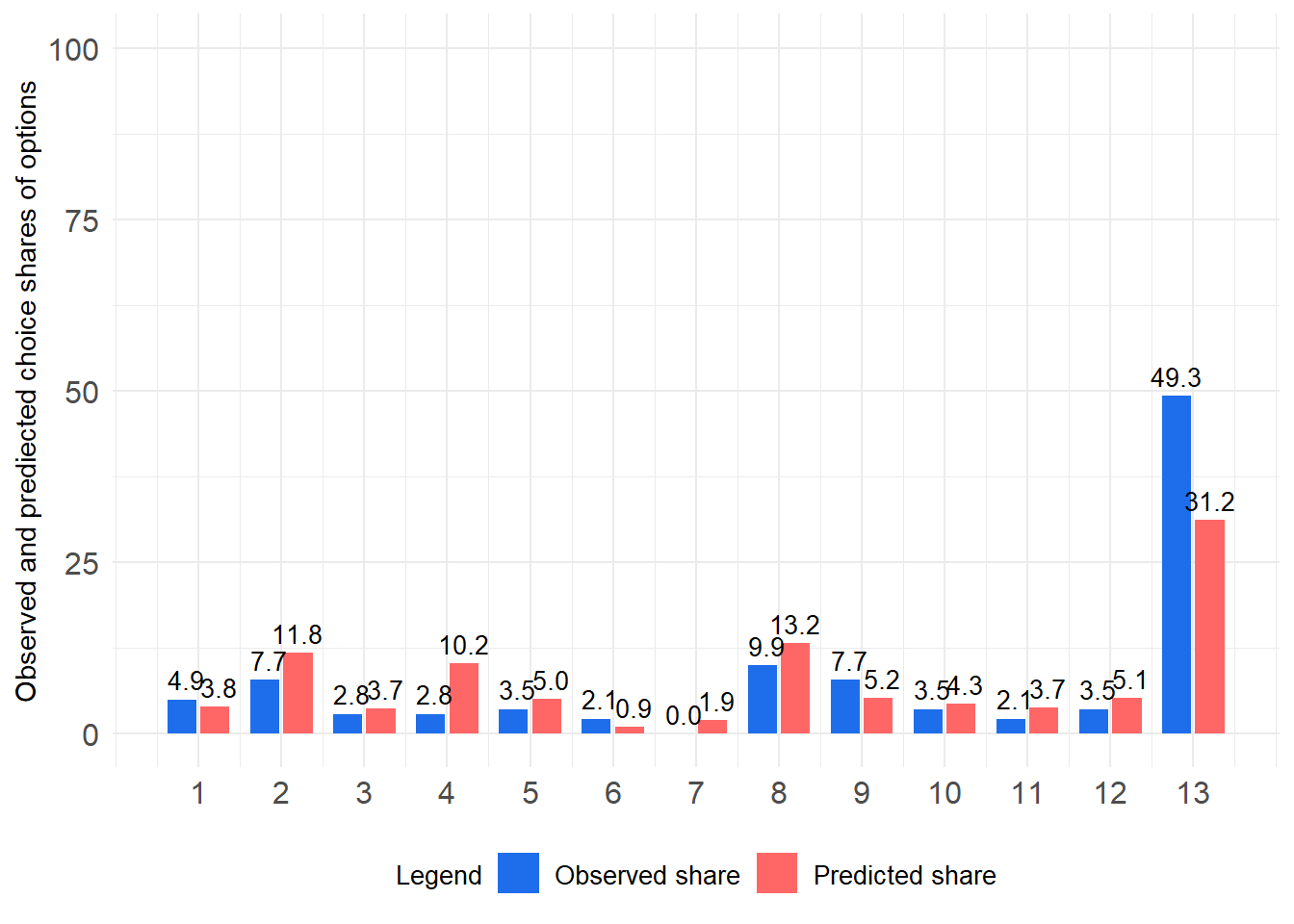
Note
We see that predictions are quite close to the observed shares for most options, except for option 13 (i.e., the none option in HOT1), which is underpredicted by our model. Thus, the general product demand is somewhat overestimated.
7.2.3 Median Absolute Error
Next, we calculate the median absolute error (MedAE). Remember since we already have the mae data frame, this is quite easy. Instead of using the mean(), we use the median() function.
# A tibble: 1 × 1
  MedAE
  <dbl>
1  1.64
Note
Since the median absolute error is roughly 2% less than the mean absolute error, we can say that the predicted and observed shares for some alternatives deviate more strongly than for others (i.e., for some of the options in the HOT (e.g., the none option), we observe outliers in terms of worse predictions).
7.2.4 Root-Mean-Square Error
Now, we calculate the root-mean-squared error (RMSE), which is quite easy again since we already have the observed and predicted share. We now just square the individual deviations and take the square root (sqrt()) of their mean.
7.2.5 Cohen’s kappa (\(\kappa\))
Next we use the function cohen.kappa() from the psych package (Revelle, 2026) to evaluate agreement between predicted and actually chosen products in the HOT.
cohen.kappa(x, alpha) expects 2 arguments:
- x: a dataframe with two columns representing the observed and the predicted choices
- alpha: the accepted alpha error rate for inferential statistics
cohens_kappa <- psych::cohen.kappa(
  x = HOT_data |> dplyr::select(HOT1, predicted_choice) |> as.data.frame(),
  alpha = 0.05
)

cohens_kappa$confid[1, ]
lower estimate upper
0.1304035 0.2279681 0.3255328 Remember from class, that common classification for kappa is (Landis & Koch, 1977):
| Cohen‘s Kappa | Predictive validity |
|---|---|
| <0 | Poor |
| [0 | 0.2] | Slight |
| ]0.2 | 0.4] | Fair |
| ]0.4 | 0.6] | Moderate |
| ]0.6 | 0.8] | Substantial |
| ]0.8 | 1] | Almost perfect |
Note
In our PS4 bundle study the predictive validity of our model is fair, since \(\kappa\) is 0.228 Moreover, the confidence interval also does not include 0, meaning that the agreement between observed and predicted choices is significantly better than those obtained through guessing.
We can verify this by looking at the p-value and the corresponding z-value. Therefore, we use the irr package (Gamer, Lemon, & Singh, 2019) and the provided kappa2() function.
Cohen's Kappa for 2 Raters (Weights: unweighted)
Subjects = 142
Raters = 2
Kappa = 0.228
z = 6.7
p-value = 2.11e-11
Note
Again, we can see that the predictive validity significantly exceeds the chance level.
7.2.6 Mean Hit Probability
Let us look at the final metric to validate our holdout task, the mean hit probability (MHP). To calculate the MHP, we once again need some data wrangling, however, nothing completely new. We, again, have to use a for() loop, however, this time we need to apply this for each row. Remember that the MHP is simply the mean of the predicted choice probability for the actual chosen products across respondents in the HOT. We store the choice probability of the actual choice in a new variable called mhp. Therefore, we first initialize this variable with a starting value of 0 in a newly established dataframe named HOT_data_frame. For each row in this dataframe, we store the choice probability for the actual choice in mhp. We get the actual choice of each participant i by running HOT_data_frame[i, "HOT1"]. We add 1 to the actual choice since the alternatives start in the second column and beyond. Finally, we store the choice probability by using the column index we calculated in the previous step.
HOT_data_frame <- as.data.frame(HOT_data)
HOT_data_frame$mhp <- 0
for (i in 1:nrow(HOT_data_frame)) {
HOT_data_frame[i, "mhp"] <- HOT_data_frame[i, (HOT_data_frame[i, "HOT1"]+1)]
}Lets review the results:
ID HOT1 predicted_choice mhp
1 1 13 9 15.415094
2 2 13 13 85.660377
3 14 5 1 1.169811
4 15 13 4 44.433962
5 17 2 2 73.528302
6 18 12 2 31.320755The final step is to take the arithmetic mean of the variable mhp across all respondents.
Note
Interpretation: The Mean hit probability is 33.567%. This means that, on average, the conjoint model assigns a choice likelihood of only 33.567% to the HOT-alternatives the consumers actually decided for.
7.3 Introducing a convenient function to validate HOTs
Now, I will show you a convenient way to automate all the above steps in a single R function.
Remember, R is a functional programming language, meaning we can define a function that takes some arguments as input and delivers a result as an output.
- We have to teach R that function.
- Afterwards, we can apply (‘call’) the function.
In the code chunk below, I have summarized each of the steps we discussed during this unit in a single function() named ‘Validate_a_single_HOT’. The function only expects one argument (a data set, such as our tibble HOT_complete) and returns a list of results containing the HOT-metrics discussed before.
Important
MAKE SURE that the variable indicating the actual choice of the consumers is the last column in the dataset. Also, ensure that the first column is named ID and houses the case ID’s in numerical form. The variables in between should be the predicted choice probabilities for each alternative in the HOT, starting with option_1 and ending with option_n (where n is the number of alternatives in the HOT). These should be scaled in percentages (i.e., 0 to 100).
Please, execute the whole code chunk to teach R the function.
Validate_a_single_HOT <- function(HOT_complete = NULL) {
#load packages
if (!"pacman" %in% rownames(installed.packages())) install.packages("pacman")
require(pacman, quietly = TRUE)
pacman::p_load(ggplot2, irr, psych, readxl, tidyverse)
#make sure that the data is a tibble
d <- dplyr::as_tibble(HOT_complete)
#assume last column is the actual choice
names(d)[ncol(d)] <- "choice"
#calculate the predicted choice
d <- d %>%
dplyr::mutate(predicted_choice = max.col(m=.[, c(2:(ncol(x=.)-1))]))
#calculate the hitrate
hitrate <- d |>
dplyr::summarise(hitrate = mean(choice == predicted_choice)) |>
unlist() |>
as.numeric()
#test for significance hitrate greater than chance level
number_correct <- d |>
dplyr::summarise(number_correct = sum(choice == predicted_choice)) |>
unlist() |>
as.numeric()
undirected_binomial_test_chance_level <- binom.test(
x = number_correct,
n = nrow(d),
p = 1 / (ncol(d) - 3))
#prediction errores at the aggregate levels
error_tibble <- tibble::tibble(option = NA, prediced_share = NA, observed_share = NA)
for (k in 2:(ncol(d)-2)) {
error_tibble[(k - 1), "option"] <- k - 1
error_tibble[(k - 1), "prediced_share"] <- d[, k] |> unlist() |> as.numeric() |> mean()
error_tibble[(k - 1), "observed_share"] <- sum(d$choice == (k - 1)) / nrow(d) * 100
}
MAE <- error_tibble |>
dplyr::mutate(abs_diff = abs(prediced_share - observed_share)) |>
dplyr::summarise(MAE = mean(abs_diff)) |>
unlist() |>
as.numeric()
MedAE <- error_tibble |>
dplyr::mutate(abs_diff = abs(prediced_share - observed_share)) |>
dplyr::summarise(MedAE = median(abs_diff)) |>
unlist() |>
as.numeric()
RMSE <- error_tibble |>
dplyr::mutate(squared_diff = (prediced_share - observed_share)^2) |>
dplyr::summarise(RMSE = squared_diff |> mean() |> sqrt()) |>
unlist() |>
as.numeric()
#Cohen's kappa with confidence intervals and z-test
Cohens_Kappa <- psych::cohen.kappa(
x = d |> dplyr::select(choice, predicted_choice) |> as.data.frame(),
alpha = 0.05
)
Cohens_Kappa_CIs <- Cohens_Kappa$confid[1, ]
z_test_Cohens_Kappa <- irr::kappa2(ratings = d |> dplyr::select(choice, predicted_choice))
Cohens_kappa <- list(Cohens_Kappa_95_percent_CIs = Cohens_Kappa_CIs,
z_test_Cohens_Kappa = z_test_Cohens_Kappa)
#calculate the mean hit probability
MHP_data_frame <- as.data.frame(d)
MHP_data_frame$mhp <- 0
for (i in 1:nrow(MHP_data_frame)) {
MHP_data_frame[i, "mhp"] <- MHP_data_frame[i, (MHP_data_frame[i, "choice"]+1)]
}
MHP <- MHP_data_frame$mhp |> mean()
#visualize the observed and predicted shares for each option in the HOT
error_tibble_stacked <- error_tibble |>
tidyr::pivot_longer(data = _,
cols = -option,
names_to = "predicted_vs_observed",
values_to = "share")
Share_plot <- error_tibble_stacked |>
ggplot2::ggplot(data=_, aes(fill = predicted_vs_observed, y = share, x = option)) +
ggplot2::geom_bar(width = 0.7, position = position_dodge(width = 0.8), stat = "identity") +
ggplot2::theme_minimal() +
ggplot2::ylab("Observed and prediected choice shares of alternatives") +
ggplot2::theme(
legend.title = element_text(size = 10),
legend.text = element_text(size = 10),
axis.text.y = element_text(size = 12),
axis.text.x = element_text(size = 12),
axis.line = element_blank(),
axis.title.y = element_text(size = 11),
axis.title.x = element_blank(),
legend.position = "bottom"
) +
ggplot2::geom_text(
aes(label = format(round(share, 1), nsmall = 1)),
position = position_dodge(width = 0.8),
size = 3.5,
vjust = -0.48
) +
ggplot2::scale_y_continuous(limits = c(0, 100)) +
scale_x_continuous(breaks = unique(error_tibble_stacked$option)) +
ggplot2::scale_fill_manual(values = c("#1E6DEB", "#FF6666"),
labels = c("Observed share", "Predicted share")) +
ggplot2::labs(fill = "Legend")
#add a variable indicating whether the predicted choice equals the actual choice (i.e., the hits)
d <- d |>
dplyr::mutate(hit = case_when(
choice == predicted_choice ~ 1,
TRUE ~ 0
))
# some other stats
Respondents_in_dataset = length(d$predicted_choice)
Alternatives_In_HOT = ncol(d) - 4
Chance_Level_correct_Prediction_Percent = 1 / (ncol(d) - 4) * 100
datasetstats <- list(Respondents_in_dataset = Respondents_in_dataset,
Alternatives_In_HOT = Alternatives_In_HOT,
Chance_Level_correct_Prediction_Percent = Chance_Level_correct_Prediction_Percent,
HOT_data_including_hits = cbind(d, hit_probability = MHP_data_frame$mhp))
Single_HOT_Validation_Results <- list(
Respondents_in_dataset = datasetstats$Respondents_in_dataset,
Alternatives_In_HOT = datasetstats$Alternatives_In_HOT,
Chance_Level_correct_Prediction_Percent = datasetstats$Chance_Level_correct_Prediction_Percent,
Hitrate = hitrate * 100,
Binomial_test_Hitrate_greater_chance = undirected_binomial_test_chance_level,
Mean_Absolute_Error = MAE,
Median_Absolute_Error = MedAE,
Root_Mean_Squared_Error = RMSE,
Cohens_kappa = Cohens_kappa,
Mean_Hit_Probability = MHP,
Plot = Share_plot,
HOT_data_including_hits = datasetstats$HOT_data_including_hits,
Prediction_Observed_shares_per_alternative = error_tibble
)
return(Single_HOT_Validation_Results)
}Afterwards we can use the function by calling Validate_a_single_HOT() and assigning the results to a new object ‘validation_results’. The object will be a list containing all the metrics we have calculated before. We can then easily access the results by calling the corresponding list elements.
validation_results <- Validate_a_single_HOT(HOT_complete = HOT_complete)
validation_results |>
names() [1] "Respondents_in_dataset"
[2] "Alternatives_In_HOT"
[3] "Chance_Level_correct_Prediction_Percent"
[4] "Hitrate"
[5] "Binomial_test_Hitrate_greater_chance"
[6] "Mean_Absolute_Error"
[7] "Median_Absolute_Error"
[8] "Root_Mean_Squared_Error"
[9] "Cohens_kappa"
[10] "Mean_Hit_Probability"
[11] "Plot"
[12] "HOT_data_including_hits"
[13] "Prediction_Observed_shares_per_alternative"Lets have a look at the most important metrics:
validation_results[c("Hitrate",
"Mean_Absolute_Error",
"Median_Absolute_Error",
"Root_Mean_Squared_Error",
"Mean_Hit_Probability",
"Cohens_kappa",
"Binomial_test_Hitrate_greater_chance",
"Plot")]$Hitrate
[1] 39.43662
$Mean_Absolute_Error
[1] 3.546281
$Median_Absolute_Error
[1] 1.635663
$Root_Mean_Squared_Error
[1] 5.773459
$Mean_Hit_Probability
[1] 33.56697
$Cohens_kappa
$Cohens_kappa$Cohens_Kappa_95_percent_CIs
    lower  estimate     upper
0.1304035 0.2279681 0.3255328
$Cohens_kappa$z_test_Cohens_Kappa
 Cohen's Kappa for 2 Raters (Weights: unweighted)

 Subjects = 142
   Raters = 2
    Kappa = 0.228

        z = 6.7
  p-value = 2.11e-11
$Binomial_test_Hitrate_greater_chance
Exact binomial test
data: number_correct and nrow(d)
number of successes = 56, number of trials = 142, p-value < 2.2e-16
alternative hypothesis: true probability of success is not equal to 0.07692308
95 percent confidence interval:
0.3134501 0.4797854
sample estimates:
probability of success
0.3943662
$Plot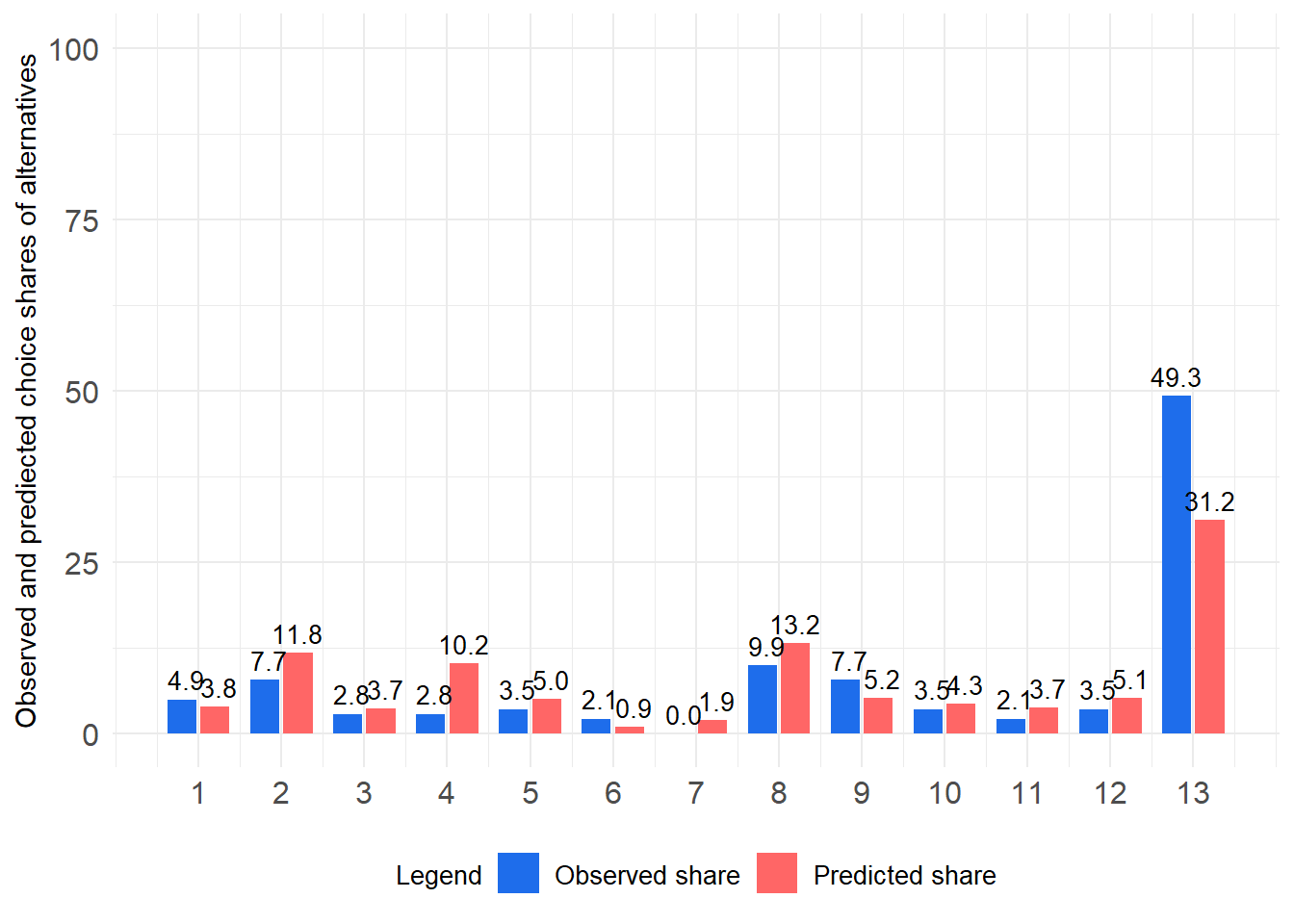
Finally, we can apply the established function to the small example we using during class when introducing the validation metrics.
Make sure that the file ‘HOTs_data_lecture.xlsx’ is located in your RStudio project folder. It contains the predicted choice shares as well as the actual HOT choices. You may find this file in the E-Learning course.
Let us first import the data to a new tibble.
HOTs_data_lecture <- readxl::read_xlsx("HOTs_data_lecture.xlsx", sheet = "sheet1")The data looks exactly like the example in your slides:
HOTs_data_lecture# A tibble: 3 × 5
ID option_1 option_2 option_3 choice
<dbl> <dbl> <dbl> <dbl> <dbl>
1 1 98.2 0 1.8 1
2 2 26.9 0 73.1 1
3 3 0 11.9 88.1 2Finally, we apply the function Validate_a_single_HOT() to it
validation_results_lecture <- Validate_a_single_HOT(HOT_complete = HOTs_data_lecture)

validation_results_lecture |>
  names()
[1] "Respondents_in_dataset"
[2] "Alternatives_In_HOT"
[3] "Chance_Level_correct_Prediction_Percent"
[4] "Hitrate"
[5] "Binomial_test_Hitrate_greater_chance"
[6] "Mean_Absolute_Error"
[7] "Median_Absolute_Error"
[8] "Root_Mean_Squared_Error"
[9] "Cohens_kappa"
[10] "Mean_Hit_Probability"
[11] "Plot"
[12] "HOT_data_including_hits"
[13] "Prediction_Observed_shares_per_alternative"Now, we can compare the results:
validation_results_lecture[c("Hitrate",
                     "Mean_Absolute_Error",
                     "Median_Absolute_Error",
                     "Root_Mean_Squared_Error",
                     "Mean_Hit_Probability",
                     "Cohens_kappa",
                     "Binomial_test_Hitrate_greater_chance",
                     "Plot")]
$Hitrate
[1] 33.33333
$Mean_Absolute_Error
[1] 36.22
$Median_Absolute_Error
[1] 29.36
$Root_Mean_Squared_Error
[1] 38.45889
$Mean_Hit_Probability
[1] 45.67
$Cohens_kappa
$Cohens_kappa$Cohens_Kappa_95_percent_CIs
lower estimate upper
-0.1163677 0.1428571 0.4020820
$Cohens_kappa$z_test_Cohens_Kappa
Cohen's Kappa for 2 Raters (Weights: unweighted)
Subjects = 3
Raters = 2
Kappa = 0.143
z = 0.866
p-value = 0.386
$Binomial_test_Hitrate_greater_chance
Exact binomial test
data: number_correct and nrow(d)
number of successes = 1, number of trials = 3, p-value = 1
alternative hypothesis: true probability of success is not equal to 0.3333333
95 percent confidence interval:
0.008403759 0.905700676
sample estimates:
probability of success
0.3333333
$Plot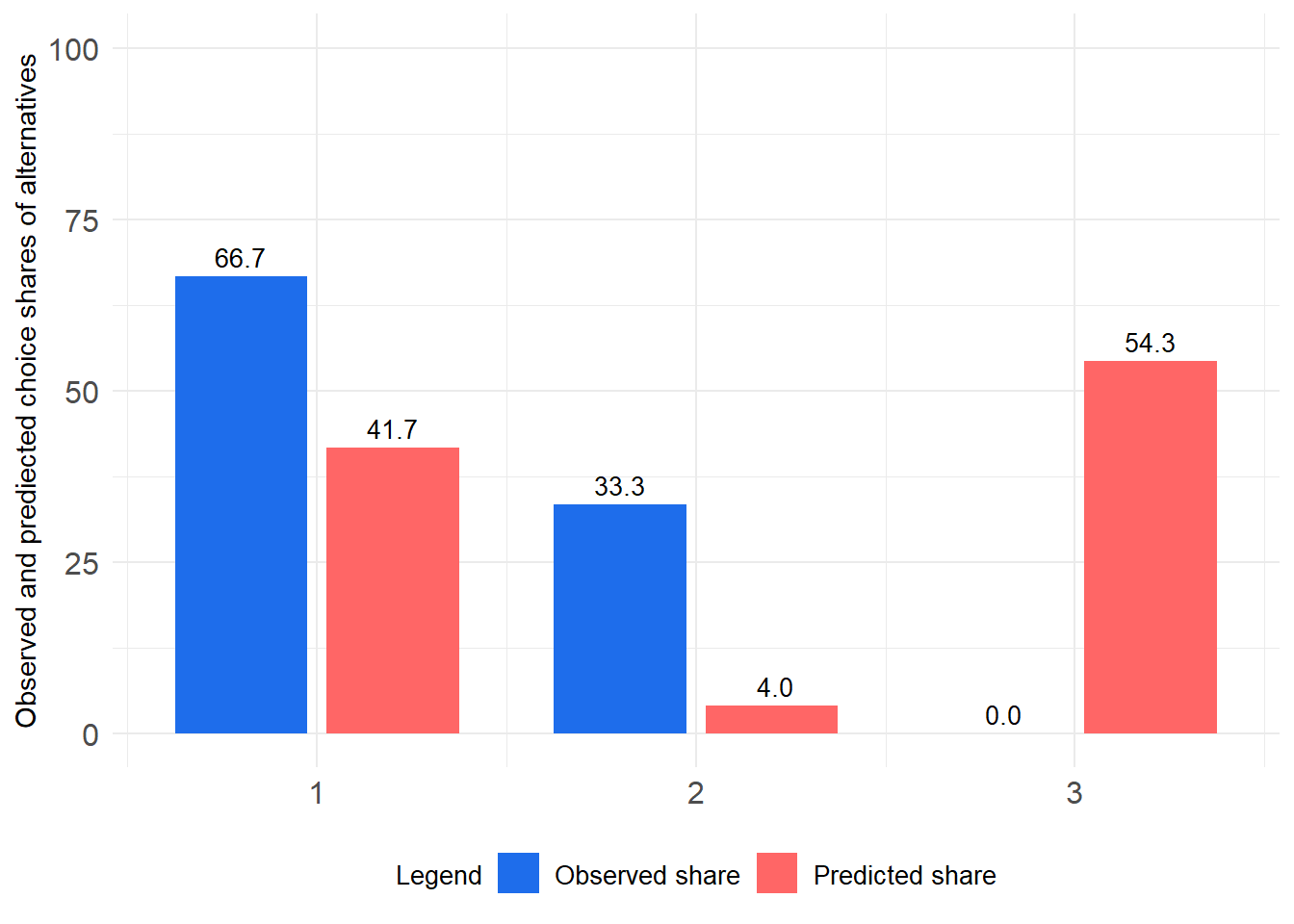
Note
Interpretation: The results perfectly mirror the results we have calculated manually during class. Thus, the function works as intended and can be applied to your case study results.
7.4 Comparing the predictive validity of two competing HB models based on holdout tasks
Often, in applied market research, we aim to compare different HB models (e.g., a model with and without interaction effects) calibrated on the same set of respondents in terms of their predictive validity. To do so, we can apply the function Validate_a_single_HOT() to the results of both models and compare the outcomes. The model with the better predictive performance (e.g., higher hit rate, lower MAE, higher Cohen’s kappa) would be considered superior in terms of its predictive validity. For a usual business case, we do many of these comparisons, and in practice, it is often the case that the more complex models (e.g., those with interaction effects) do not necessarily outperform simpler models in terms of their predictive validity due to overfitting. Thus, it is important to validate the predictive performance of our models based on holdout tasks and not just rely on in-sample fit metrics.
By comparing the predictive validity of these models based on holdout tasks, we can make informed decisions about which model to use for market simulations and decision-making. Examples for model comparisons include:
- Models with vs. without interaction effects
- Models based on linear vs. piecewise price function
- HB models for an ACBC based on 3 vs. 4 stages
- Models with vs. without demographic covariates
- Models with vs. without contraints used in estimation
- Models based on different prior settings
In this example we will use the PS4 bundle data again and compare the predictive validity of two HB models. The first model is the one, we used before. The second model includes the (optional) fourth Calibration stage of ACBC and thus comes with an updated utility estimate for the none-option. We will apply the function Validate_a_single_HOT() to both models and compare the results.
Since, we already have established the validation results for the first model (validation_results), we will now focus on the second model. We have already run the second model in Sawtooth Software Lighthouse Studio and stored the results for the simulation of predicted choices in HOT1 in our working directory (Simulation Report_HOT1_four_stages.xlsx). Lets import this file.
7.4.1 Data import and wrangling
HOT1_simulation_model_2 <- readxl::read_xlsx("Simulation Report_HOT1_four_stages.xlsx", sheet = "HOT1_four_stages | Individual", skip = 1)

HOT1_simulation_model_2
# A tibble: 142 × 14
ID option_1 option_2 option_3 option_4 option_5 option_6 option_7 option_8
<chr> <dbl> <dbl> <dbl> <dbl> <dbl> <dbl> <dbl> <dbl>
1 1 0 0 0.000377 0.0238 0.0158 0.0185 0.100 0.0221
2 2 0.138 0.00547 0 0 0.0142 0 0.00245 0.0469
3 14 0.246 0.0357 0 0.00453 0.00547 0 0.0909 0.000377
4 15 0.000189 0 0 0.0183 0 0 0 0
5 17 0 0.703 0.0953 0 0 0 0 0.0121
6 18 0 0.335 0.0464 0 0 0 0 0.0179
7 19 0 0.112 0.255 0 0.00113 0 0 0.210
8 27 0.000189 0 0 0 0.000566 0 0 0.0291
9 28 0 0.00358 0.0249 0 0 0 0 0.117
10 29 0 0.189 0.00113 0 0.00132 0 0 0.000755
# ℹ 132 more rows
# ℹ 5 more variables: option_9 <dbl>, option_10 <dbl>, option_11 <dbl>,
# option_12 <dbl>, None <dbl>Next we will transform the numbers into the scale of percentages.
HOT1_simulation_model_2 <- cbind(ID = HOT1_simulation_model_2[,1],
                         HOT1_simulation_model_2[,2:ncol(HOT1_simulation_model_2)]*100) |>
  tibble::tibble()

HOT1_simulation_model_2$ID <- as.numeric(HOT1_simulation_model_2$ID)

HOT1_simulation_model_2
# A tibble: 142 × 14
ID option_1 option_2 option_3 option_4 option_5 option_6 option_7 option_8
<dbl> <dbl> <dbl> <dbl> <dbl> <dbl> <dbl> <dbl> <dbl>
1 1 0 0 0.0377 2.38 1.58 1.85 10.0 2.21
2 2 13.8 0.547 0 0 1.42 0 0.245 4.69
3 14 24.6 3.57 0 0.453 0.547 0 9.09 0.0377
4 15 0.0189 0 0 1.83 0 0 0 0
5 17 0 70.3 9.53 0 0 0 0 1.21
6 18 0 33.5 4.64 0 0 0 0 1.79
7 19 0 11.2 25.5 0 0.113 0 0 21.0
8 27 0.0189 0 0 0 0.0566 0 0 2.91
9 28 0 0.358 2.49 0 0 0 0 11.7
10 29 0 18.9 0.113 0 0.132 0 0 0.0755
# ℹ 132 more rows
# ℹ 5 more variables: option_9 <dbl>, option_10 <dbl>, option_11 <dbl>,
# option_12 <dbl>, None <dbl>After that, we import the actual choice of the respondents for the options in the holdout task HOT1 (Note, that this data is identical to those we have used to validate the first model, since the actual choices remain constant across the model validation attempts).
Next, we merge both sources of information.
HOT_complete <- dplyr::right_join(HOT1_simulation_model_2,
                                   HOT1_choices,
                                   by = "ID")

#look at just a few variables
HOT_complete |>
  dplyr::select(ID, option_11, option_12, None, HOT1)
# A tibble: 142 × 5
ID option_11 option_12 None HOT1
<dbl> <dbl> <dbl> <dbl> <int>
1 1 5.72 14.1 11.2 13
2 2 0.132 0.0755 78 13
3 14 0.0566 0.226 44.7 5
4 15 0 0 98.1 13
5 17 0.151 3.21 9.30 2
6 18 6.70 22.8 30.4 12
7 19 3.96 36.7 0.585 13
8 27 52.1 14.7 30.2 11
9 28 10.0 3.85 71.5 12
10 29 0.0189 13.6 55.6 13
# ℹ 132 more rows7.4.2 Doing the holdout task validation
Now, we can apply the function Validate_a_single_HOT() to the second model.
validation_results_model_2 <- Validate_a_single_HOT(HOT_complete = HOT_complete)

validation_results_model_2[c("Hitrate",
                     "Mean_Absolute_Error",
                     "Median_Absolute_Error",
                     "Root_Mean_Squared_Error",
                     "Mean_Hit_Probability",
                     "Cohens_kappa",
                     "Binomial_test_Hitrate_greater_chance",
                     "Plot")]
$Hitrate
[1] 52.11268
$Mean_Absolute_Error
[1] 1.386174
$Median_Absolute_Error
[1] 0.9884401
$Root_Mean_Squared_Error
[1] 1.712981
$Mean_Hit_Probability
[1] 44.78674
$Cohens_kappa
$Cohens_kappa$Cohens_Kappa_95_percent_CIs
lower estimate upper
0.2072108 0.3106796 0.4141484
$Cohens_kappa$z_test_Cohens_Kappa
Cohen's Kappa for 2 Raters (Weights: unweighted)
Subjects = 142
Raters = 2
Kappa = 0.311
z = 8.3
p-value = 0
$Binomial_test_Hitrate_greater_chance
Exact binomial test
data: number_correct and nrow(d)
number of successes = 74, number of trials = 142, p-value < 2.2e-16
alternative hypothesis: true probability of success is not equal to 0.07692308
95 percent confidence interval:
0.4357578 0.6055961
sample estimates:
probability of success
0.5211268
$Plot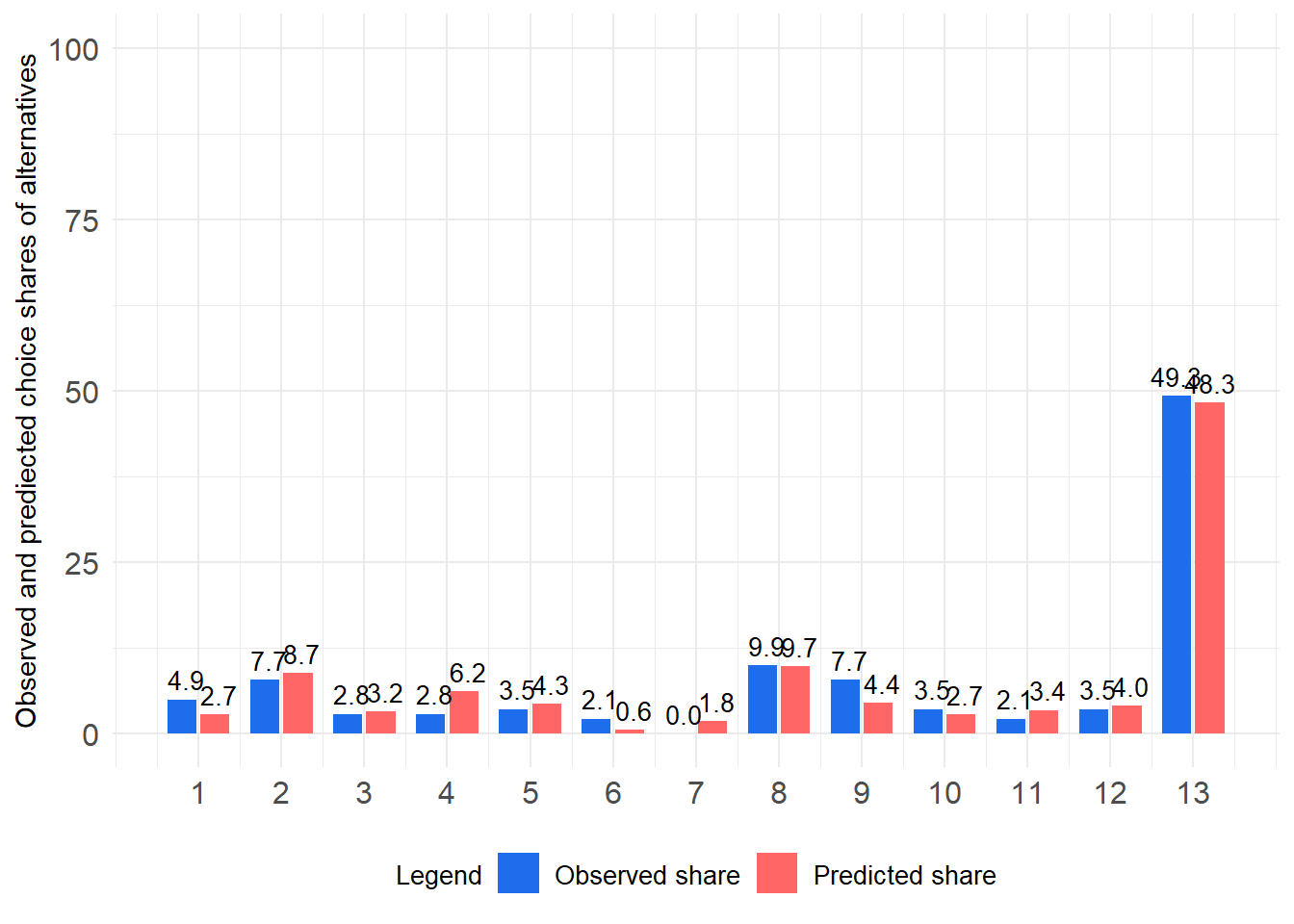
7.4.3 Comparing both models’ predictive validity
Note
Interpretation: When we compare the validation results of the two models, we see that the second model (with the fourth calibration stage) has a higher hit rate, lower mean absolute error, lower median absolute error, lower root-mean-squared error, higher mean hit probability, and higher Cohen’s kappa than the first model (without the fourth calibration stage). Thus, we can conclude that the second model has better predictive validity than the first model in terms of its performance in the holdout task HOT1. This suggests that including the fourth calibration stage in the ACBC estimation process may lead to improved predictions of consumer choices in this case. When inspecting the plots for both models, its easy to understand that the improvement in predictive validity is mainly driven by the better prediction of the none option in HOT1, which is underpredicted by the first model and much better predicted by the second model.
Comparison in table format
We next build a table to summarize the results of both models for the most important metrics.
Model_comparison_table <- tibble::tibble(
  Metric = c("n",
             "Hit Rate (%)",
             "Mean Absolute Error",
             "Median Absolute Error",
             "Root Mean Squared Error",
             "Mean Hit Probability (%)",
             "Cohen's kappa"),
  Model_1 = c(validation_results$Respondents_in_dataset ,
              validation_results$Hitrate,
              validation_results$Mean_Absolute_Error,
              validation_results$Median_Absolute_Error,
              validation_results$Root_Mean_Squared_Error,
              validation_results$Mean_Hit_Probability,
              validation_results$Cohens_kappa$Cohens_Kappa_95_percent_CIs[2]),
  Model_2 = c(validation_results_model_2$Respondents_in_dataset,
              validation_results_model_2$Hitrate,
              validation_results_model_2$Mean_Absolute_Error,
              validation_results_model_2$Median_Absolute_Error,
              validation_results_model_2$Root_Mean_Squared_Error,
              validation_results_model_2$Mean_Hit_Probability,
              validation_results_model_2$Cohens_kappa$Cohens_Kappa_95_percent_CIs[2]))

Model_comparison_table |> knitr::kable(digits = 3)| Metric | Model_1 | Model_2 |
|---|---|---|
| n | 142.000 | 142.000 |
| Hit Rate (%) | 39.437 | 52.113 |
| Mean Absolute Error | 3.546 | 1.386 |
| Median Absolute Error | 1.636 | 0.988 |
| Root Mean Squared Error | 5.773 | 1.713 |
| Mean Hit Probability (%) | 33.567 | 44.787 |
| Cohen’s kappa | 0.228 | 0.311 |
Visual comparision of predicted and observed choice shares
Since the results object produced by Validate_a_single_HOT() also contains the predicted and observed shares for each alternative in the HOT (i.e., the list element Prediction_Observed_shares_per_alternative), we can also compare these values for both models. To do so, we can simply merge the corresponding data frames containing the predicted and observed shares for both models and visualize them in a single plot.
observed_and_predicted_shares <- dplyr::left_join(
  validation_results$Prediction_Observed_shares_per_alternative |>
    dplyr::mutate(model = "Model 1"),
  validation_results_model_2$Prediction_Observed_shares_per_alternative |>
    dplyr::mutate(model = "Model 2"),
  by = "option",
  suffix = c("_model_1", "_model_2")
) |>
  dplyr::select(option, observed_share = observed_share_model_1, prediced_share_model_1, prediced_share_model_2)


observed_and_predicted_shares
# A tibble: 13 × 4
option observed_share prediced_share_model_1 prediced_share_model_2
<dbl> <dbl> <dbl> <dbl>
1 1 4.93 3.82 2.70
2 2 7.75 11.8 8.73
3 3 2.82 3.65 3.15
4 4 2.82 10.2 6.18
5 5 3.52 5.00 4.27
6 6 2.11 0.861 0.560
7 7 0 1.87 1.82
8 8 9.86 13.2 9.72
9 9 7.75 5.20 4.42
10 10 3.52 4.32 2.72
11 11 2.11 3.75 3.38
12 12 3.52 5.14 4.00
13 13 49.3 31.2 48.3 From this, we stack the data again to visualize the observed and predicted shares for both models within a single plot.
observed_and_predicted_shares_stacked <- observed_and_predicted_shares |>
    tidyr::pivot_longer(data = _,
                        cols = -option,
                        names_to = "predicted_vs_observed",
                        values_to = "share")


Share_plot <- observed_and_predicted_shares_stacked |>
    ggplot2::ggplot(data=_, aes(fill = predicted_vs_observed, y = share, x = option)) +
  ggplot2::geom_bar(width = 0.7, position = position_dodge(width = 0.8), stat = "identity") +
  ggplot2::theme_minimal() +
  ggplot2::ylab("Observed and prediected choice shares of alternatives") +
  ggplot2::theme(
    legend.title = element_text(size = 10),
    legend.text = element_text(size = 10),
    axis.text.y = element_text(size = 12),
    axis.text.x = element_text(size = 12),
    axis.line = element_blank(),
    axis.title.y = element_text(size = 11),
    axis.title.x = element_blank(),
    legend.position = "bottom"
  ) +
  ggplot2::geom_text(
    aes(label = format(round(share, digits = 1), nsmall = 1)),
    position = position_dodge(width = 0.8),
    size = 3.5,
    angle = 90,
    hjust = -0.15
  ) +
  ggplot2::scale_y_continuous(limits = c(0, 100)) +
  scale_x_continuous(breaks = unique(observed_and_predicted_shares_stacked$option)) +
  ggplot2::scale_fill_manual(values = c("#1E6DEB", "#FF6666", "#D67F04"),
                             labels = c("Observed share", "Model 1 predicted share", "Model 2 predicted share")) +
  ggplot2::labs(fill = "Legend")

Share_plot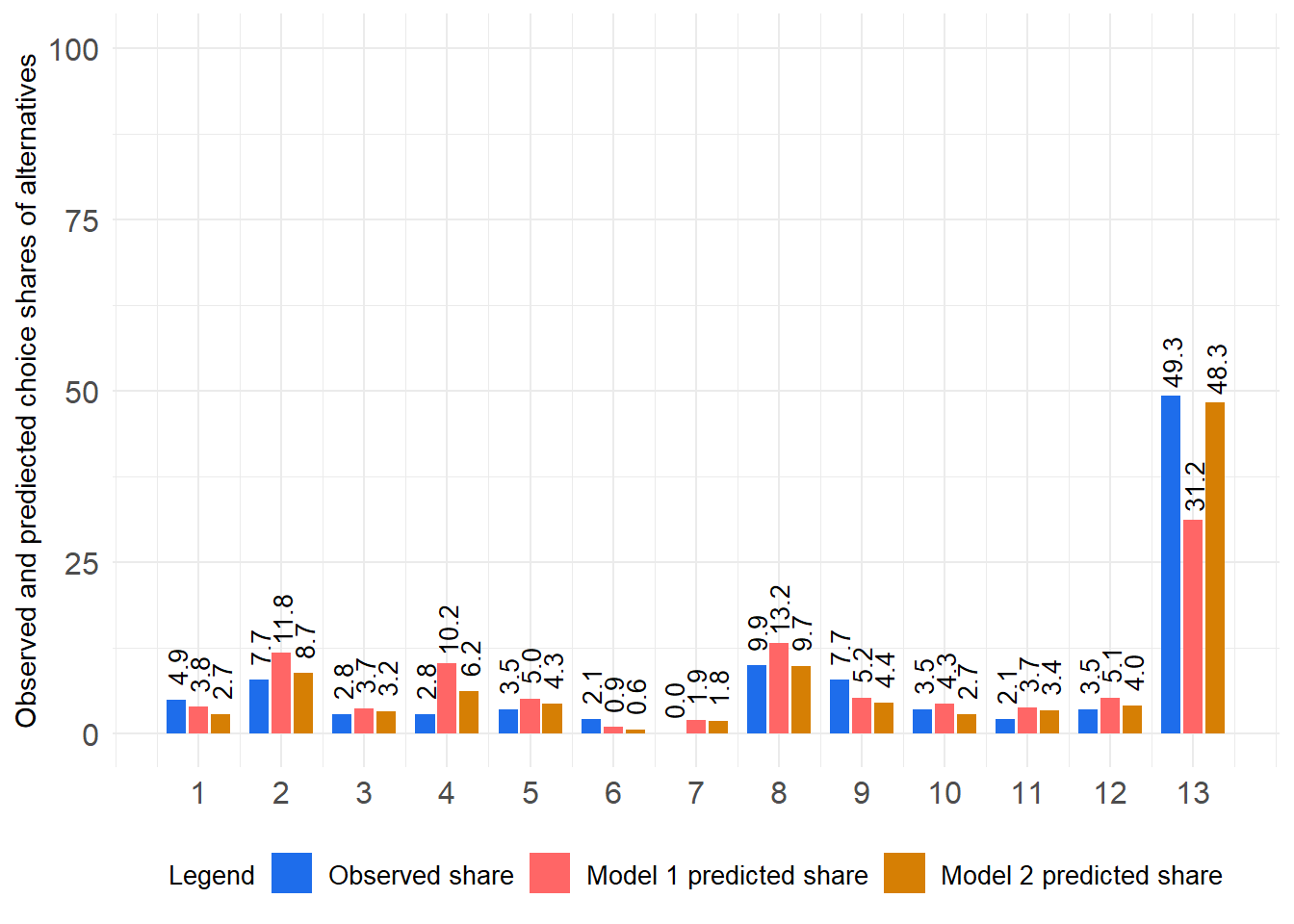
Comparing the HB models in terms of classic statistical significance.
To ultimately decide which model to prefer, one can also determine whether one models significantly better predicts the choices observed in the holdout task compared to another HB model. Usually, when relying on Bayesian analysis, research would look a the samples drawn from the posterior distribution. Thus, we would need to evaluate for different samples drawn, whether one model is superior in a significant fraction of draws over the other model (see, Schramm et al. (2025) for an application). However, this goes beyond our introduction. We will continue to work with the point estimates of the utility as done before.
The results objects for both model validations (validation_results and validation_results_model_2) contain the list element named HOT_data_including_hits, which includes the predicted choice probabilities for the actual choices in the holdout task as well as a variable indicating whether the predicted choice equals the actual choice (i.e., hit = 1) or not (i.e., hit = 0). We can use this information to compare the predictive performance of both models in terms of hits and hit probabilities across respondents in the holdout task.
Important
Beware For the subsequent analyses steps, you need two result objects for different HB models coming from the function Validate_a_single_HOT(). Make sure that both result objects are available in your R environment and that they are named validation_results and validation_results_model_2, respectively. Otherwise, the code will not work. Also make sure that both validation results are based on the same holdout task (i.e., the same respondents and the same actual choices, with the same ordering of respondents and HOT choices) since we will be comparing the hits and hit probabilities across respondents in the holdout task.
Comparision of individual hits based on exact McNemar tests
One way of comparing the predictive performance of both models is to look at the hits (i.e., whether the predicted choice equals the actual choice) across respondents in the holdout task. We can build a contingency table to summarize the number of times each model correctly predicts the choices in the holdout task and then apply an exact McNemar test to evaluate whether there is a significant difference in the predictive performance of both models. The McNemar test is a non-parametric test used to compare paired proportions, which is suitable for our case since we have paired data (i.e., the same respondents in the holdout task are used to evaluate both models).
Applying an exact McNemar test is mathematically equivalent to a binomial test for the number of times one model is better than the other model in terms of hits (i.e., correct predictions).
Below, we first establish a new tibble named hits_both_models that contains the hit information (0=no hit, 1=hit) for both models.
hits_both_models <- tibble::tibble(hits_model_1 = validation_results$HOT_data_including_hits$hit,
               hits_model_2 = validation_results_model_2$HOT_data_including_hits$hit)

hits_both_models
# A tibble: 142 × 2
hits_model_1 hits_model_2
<dbl> <dbl>
1 0 0
2 1 1
3 0 0
4 0 1
5 1 1
6 0 0
7 1 0
8 1 1
9 0 0
10 1 1
# ℹ 132 more rowsThen, we can build a confusion matrix and other summary statistics summarizing the number of times each model correctly predicts the choices.
hits_both_models |>
  gtsummary::tbl_cross(
    row = hits_model_1,
    col = hits_model_2,
    percent = "cell"
  ) |>
  gtsummary::bold_labels() |>
  gtsummary::bold_levels() |>
  gtsummary::modify_caption(caption = "Crosstab of hits by model")
hits_model_2
|
Total | ||
|---|---|---|---|
| 0 | 1 | ||
| hits_model_1 | |||
| 0 | 56 (39%) | 30 (21%) | 86 (61%) |
| 1 | 12 (8.5%) | 44 (31%) | 56 (39%) |
| Total | 68 (48%) | 74 (52%) | 142 (100%) |
hits_both_models <- hits_both_models |>
  dplyr::mutate(better_prediction = case_when(
    hits_model_1 > hits_model_2 ~ 1,
    hits_model_1 < hits_model_2 ~ 2,
    TRUE ~ 3
  ))

  labelled::val_labels(hits_both_models$better_prediction) = c("Model 1 better"  = 1,
                                                               "Model 2 better" = 2,
                                                               "Both models equal"= 3)

  hits_both_models |> dplyr::count(better_prediction)
# A tibble: 3 × 2
better_prediction n
<dbl+lbl> <int>
1 1 [Model 1 better] 12
2 2 [Model 2 better] 30
3 3 [Both models equal] 100
Note
Interpretation: In a head-to-head comparison of the hits across respondents in the holdout task, we see that model 1 predicts the choices better than models 2 in 12 cases, while model 2 predicts the choices better than model 1 in 30 cases. Thus, model 2 seems to outperform model 1.
Next we will apply a series of binomial tests to evaluate whether the observed difference in hits between both models is statistically significant. We will test for three different alternative hypotheses: (1) model 2 is better than model 1, (2) model 1 is better than model 2, and (3) there is no difference between both models. Remember that the binomial test is mathematically equivalent to the exact McNemar test for paired proportions.
binom.test(
x = sum(hits_both_models$better_prediction == 2),
n = sum(hits_both_models$better_prediction == 2) + sum(hits_both_models$better_prediction == 1),
p = 0.5,
alternative = "greater"
)
Exact binomial test
data: sum(hits_both_models$better_prediction == 2) and sum(hits_both_models$better_prediction == 2) + sum(hits_both_models$better_prediction == 1)
number of successes = 30, number of trials = 42, p-value = 0.003958
alternative hypothesis: true probability of success is greater than 0.5
95 percent confidence interval:
0.578571 1.000000
sample estimates:
probability of success
0.7142857 binom.test(
x = sum(hits_both_models$better_prediction == 2),
n = sum(hits_both_models$better_prediction == 2) + sum(hits_both_models$better_prediction == 1),
p = 0.5,
alternative = "two.sided"
)
Exact binomial test
data: sum(hits_both_models$better_prediction == 2) and sum(hits_both_models$better_prediction == 2) + sum(hits_both_models$better_prediction == 1)
number of successes = 30, number of trials = 42, p-value = 0.007916
alternative hypothesis: true probability of success is not equal to 0.5
95 percent confidence interval:
0.5541612 0.8428085
sample estimates:
probability of success
0.7142857 binom.test(
x = sum(hits_both_models$better_prediction == 2),
n = sum(hits_both_models$better_prediction == 2) + sum(hits_both_models$better_prediction == 1),
p = 0.5,
alternative = "less"
)
Exact binomial test
data: sum(hits_both_models$better_prediction == 2) and sum(hits_both_models$better_prediction == 2) + sum(hits_both_models$better_prediction == 1)
number of successes = 30, number of trials = 42, p-value = 0.9986
alternative hypothesis: true probability of success is less than 0.5
95 percent confidence interval:
0.0000000 0.8261143
sample estimates:
probability of success
0.7142857
Note
Interpretation: Based on the first Binomial test, we can conclude that model 2 significantly outperforms model 1 in terms of hits in the holdout task (p < 0.05).
Comparision of individual mean hit probabilities based on paired Wilcoxon signed-rank tests
Next, we are going to compare the predicted choice probabilities for the actual choices in the holdout task across respondents for both models. We can apply a paired Wilcoxon signed-rank test to evaluate whether there is a significant difference. This test is a non-parametric test used to compare paired samples, which is suitable for our case since we have paired data (i.e., the same respondents in the holdout task are used to evaluate both models) and the distribution of the hit probabilities is often not normal. Since the test is actually not a test for mean differences, we rather compare the median hit probabilities across respondents for both models. However, the test is often used to compare mean differences as well, and thus, we will refer to it as a test for mean differences in the following.
hit_probability_both_models <- tibble::tibble(
hit_probability_model_1 = validation_results$HOT_data_including_hits$hit_probability,
hit_probability_model_2 = validation_results_model_2$HOT_data_including_hits$hit_probability
)
hit_probability_both_models <- hit_probability_both_models |>
tibble::rowid_to_column(.data = _, var = "ID")
#Wilcoxon signed-rank test
wilcox.test(hit_probability_both_models$hit_probability_model_1,
hit_probability_both_models$hit_probability_model_2,
paired = TRUE,
alternative = "two.sided",
exact = FALSE)
Wilcoxon signed rank test with continuity correction
data: hit_probability_both_models$hit_probability_model_1 and hit_probability_both_models$hit_probability_model_2
V = 2904.5, p-value = 0.0001402
alternative hypothesis: true location shift is not equal to 0
Note
Interpretation: Based on the Wilcoxon signed-rank test, we again conclude that there is a significant difference in the predicted hit probabilities between both models (p < 0.05). The median hit probability is higher for model 2 than for model 1, which suggests that model 2 has greater predictive validity.
Alternatively, we can also visualize the distribution of hit probabilities for both models and apply a paired Wilcoxon signed-rank test within the visualization to compare the hit probabilities. Below, we are doing so with the function ggwithinstats() from the package ggstatsplot (Patil, 2021). Before we can apply this function, we need to stack the data in a long format with pivot_longer() from the package tidyr (Wickham, Vaughan, & Girlich, 2025).
hit_probability_both_models_stacked <- hit_probability_both_models |>
tidyr::pivot_longer(data = _,
cols = c(hit_probability_model_1, hit_probability_model_2),
names_to = "model",
values_to = "hit_probability")
hit_probability_both_models_stacked# A tibble: 284 × 3
ID model hit_probability
<int> <chr> <dbl>
1 1 hit_probability_model_1 15.4
2 1 hit_probability_model_2 11.2
3 2 hit_probability_model_1 85.7
4 2 hit_probability_model_2 78
5 3 hit_probability_model_1 1.17
6 3 hit_probability_model_2 0.547
7 4 hit_probability_model_1 44.4
8 4 hit_probability_model_2 98.1
9 5 hit_probability_model_1 73.5
10 5 hit_probability_model_2 70.3
# ℹ 274 more rowsThereafter, we can apply the function ggwithinstats().
#Wilcoxon signed-rank test
hit_probability_both_models_stacked %>% ggstatsplot::ggwithinstats(
y = hit_probability,
x = model,
subject.id = ID,
type = "nonparametric",
alternative = "two.sided",
messages = FALSE,
var.equal = FALSE,
point.path = FALSE,
p.adjust.method = "bonferroni",
bf.message = FALSE
)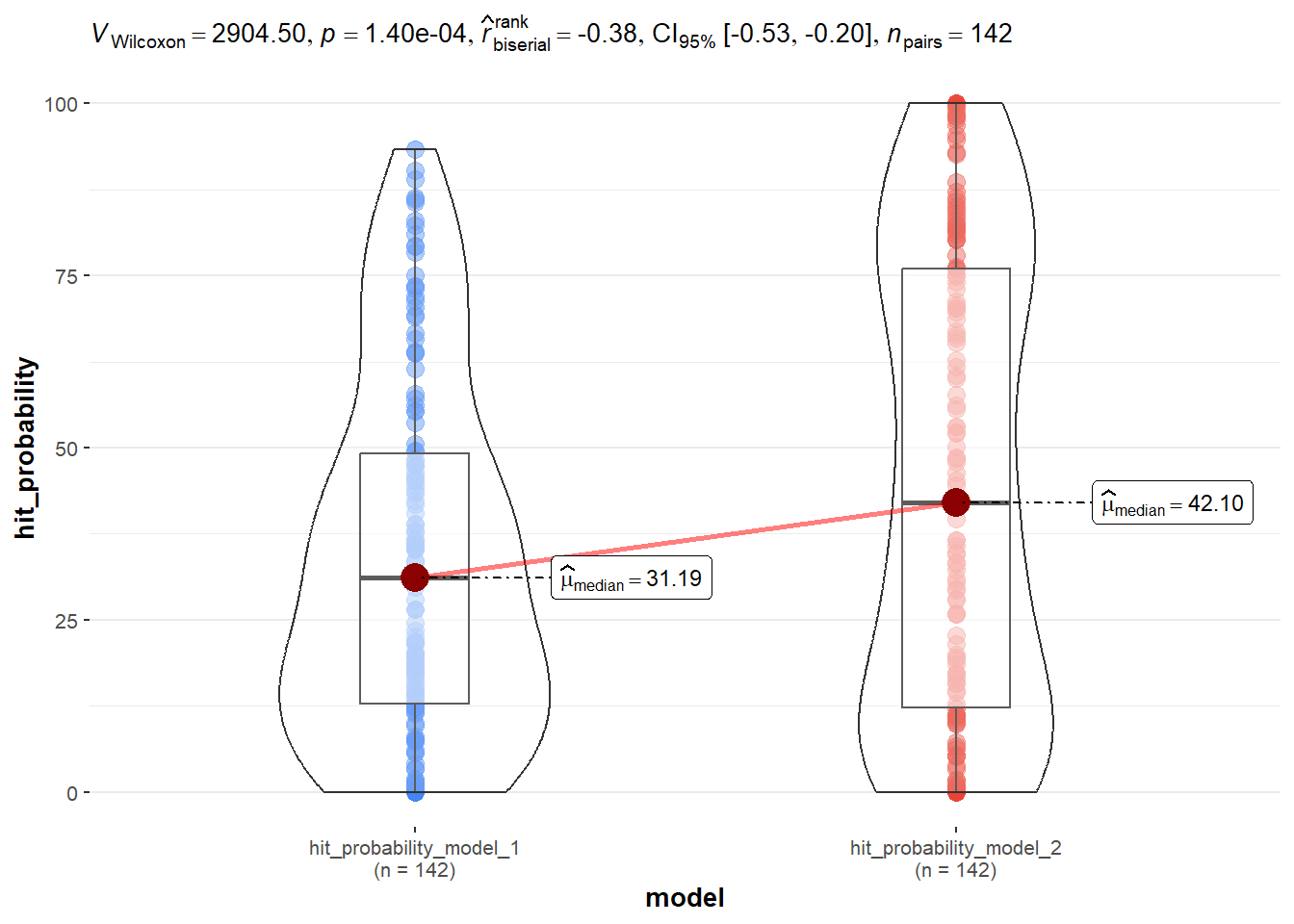
Note
Interpretation: The fundamental results remain the same. Again, we find a significant difference in the hit probabilities between both models (p < 0.05). The median hit probability is higher for model 2 than for model 1, which suggests that model 2 has better predictive performance in terms of hit probabilities in the holdout task. However, the visualization also reveals that the distribution of hit probabilities is quite skewed and bimodal in case of model 2, which may violate the assumptions of the Wilcoxon signed-rank test (with this test the shape of the distribution below the median should roughly mirror the shape above the median). Thus, we should be cautious when interpreting the results of the test and consider alternative approaches to compare the hit probabilities across models.
We will consider one alternative approach, which is to apply a rank-based inverse normal transformation to the hit probabilities and then apply a paired t-test to compare the transformed hit probabilities across models (Sablotny-Wackershauser et al., 2024; Schramm & Lichters, 2024). The rank-based inverse normal transformation is a non-parametric transformation that can help to normalize the distribution of the data and make it more suitable for parametric tests like the t-test (Gelman et al., 2014, p. 97). Below, we first apply the rank-based inverse normal transformation with the help of the function RankNorm() provided by the package RNOmni (McCaw, 2023), and then apply the function ggwithinstats() again to compare the transformed hit probabilities across models. This time, however, we will apply a paired t-test.
#rank-based inverse normal transformation
hit_probability_both_models_stacked <- hit_probability_both_models_stacked |>
dplyr::mutate(
hit_probability_transformed = RNOmni::RankNorm(u = hit_probability)
)
hit_probability_both_models_stacked %>% ggstatsplot::ggwithinstats(
y = hit_probability_transformed,
x = model,
subject.id = ID,
type = "parametric",
alternative = "two.sided",
messages = FALSE,
var.equal = FALSE,
point.path = FALSE,
p.adjust.method = "bonferroni",
bf.message = FALSE
) 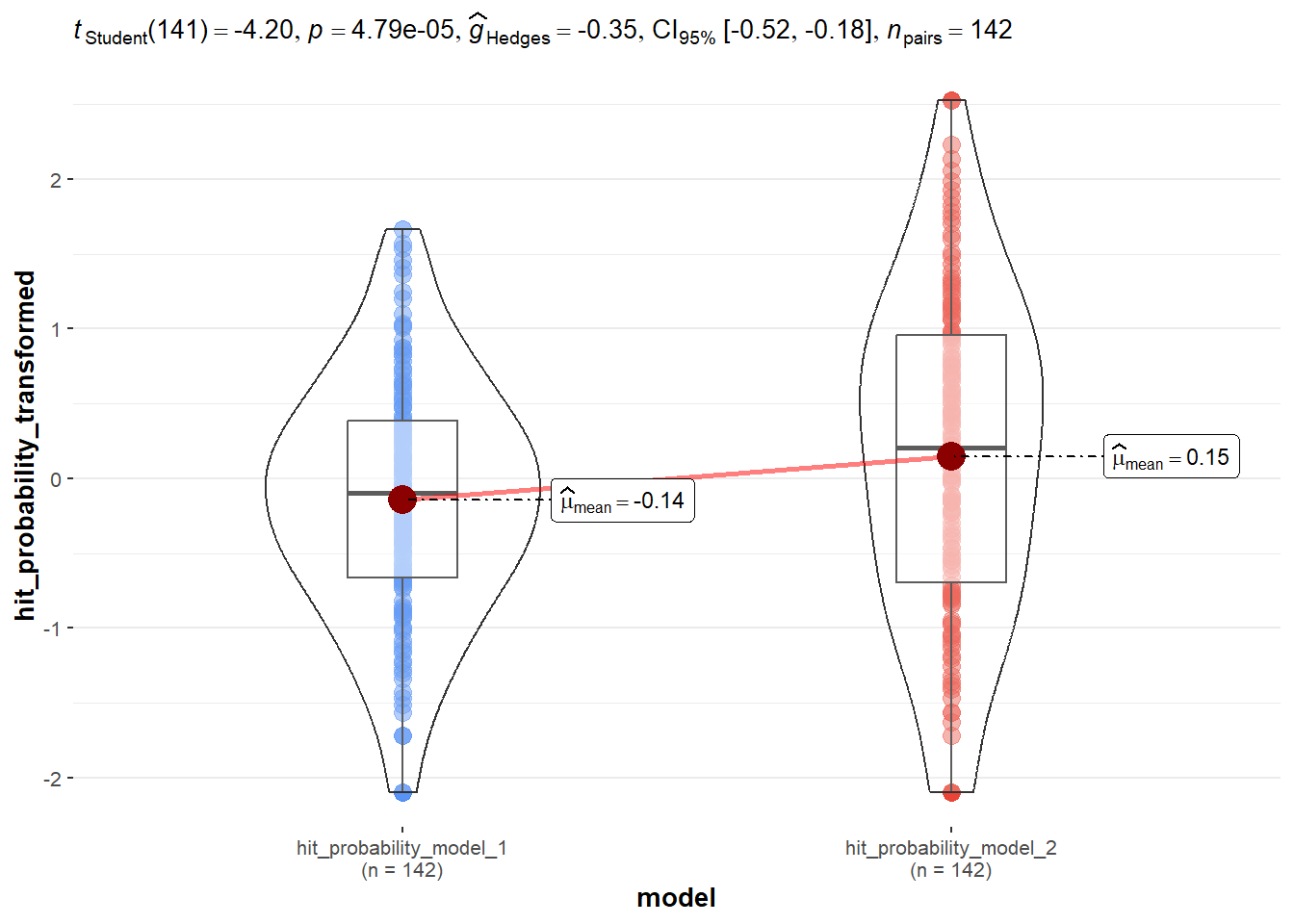
Note
Interpretation: It is easy to see that the distribution of the transfermed hit probabilities is now much more normal for both models. The results of the paired t-test again indicate a significant difference in the transformed hit probabilities between both models (p < 0.05). The mean transformed hit probability is higher for model 2 than for model 1, which suggests that model 2 has a greater predictive validity in terms of the mean hit probability.
7.5 Introducing a convenient function to compare the predictive validity of two competing HB models based on holdout tasks
To conclude our example on how to compare the predictive validity of two competing HB models based on holdout tasks, we will now establish a convenient function that takes the validation results of two models (i.e., the output of the function Validate_a_single_HOT()) and produces a summary table comparing the most important metrics for both models, a visual comparison of the observed and predicted shares for each alternative in the holdout task. The function also provides the tests for significance of the differences in the hitrate and the mean hit probability as discussed before. This function can be easily applied to the results of your case study to compare the predictive validity of different HB models you have estimated.
First we need to establish the new function named Compare_two_models_predictive_validity by running the code below.
Compare_two_models_predictive_validity <- function(validation_results_model_1 = NULL,
validation_results_model_2 = NULL) {
#load packages
if (!"pacman" %in% rownames(installed.packages())) install.packages("pacman")
require(pacman, quietly = TRUE)
pacman::p_load(tidyverse, gtsummary, RNOmni, ggstatsplot, questionr)
#model comparison table
Model_comparison_table <- tibble::tibble(
Metric = c("n",
"Hit Rate (%)",
"Mean Absolute Error",
"Median Absolute Error",
"Root Mean Squared Error",
"Mean Hit Probability (%)",
"Cohen's kappa"),
Model_1 = c(validation_results_model_1$Respondents_in_dataset ,
validation_results_model_1$Hitrate,
validation_results_model_1$Mean_Absolute_Error,
validation_results_model_1$Median_Absolute_Error,
validation_results_model_1$Root_Mean_Squared_Error,
validation_results_model_1$Mean_Hit_Probability,
validation_results_model_1$Cohens_kappa$Cohens_Kappa_95_percent_CIs[2]),
Model_2 = c(validation_results_model_2$Respondents_in_dataset,
validation_results_model_2$Hitrate,
validation_results_model_2$Mean_Absolute_Error,
validation_results_model_2$Median_Absolute_Error,
validation_results_model_2$Root_Mean_Squared_Error,
validation_results_model_2$Mean_Hit_Probability,
validation_results_model_2$Cohens_kappa$Cohens_Kappa_95_percent_CIs[2]))
# visual comparison of predicted and observed choice shares
observed_and_predicted_shares <- dplyr::left_join(
validation_results_model_1$Prediction_Observed_shares_per_alternative |>
dplyr::mutate(model = "Model 1"),
validation_results_model_2$Prediction_Observed_shares_per_alternative |>
dplyr::mutate(model = "Model 2"),
by = "option",
suffix = c("_model_1", "_model_2")
) |>
dplyr::select(option, observed_share = observed_share_model_1, prediced_share_model_1, prediced_share_model_2)
observed_and_predicted_shares_stacked <- observed_and_predicted_shares |>
tidyr::pivot_longer(data = _,
cols = -option,
names_to = "predicted_vs_observed",
values_to = "share")
Share_plot <- observed_and_predicted_shares_stacked |>
ggplot2::ggplot(data=_, aes(fill = predicted_vs_observed, y = share, x = option)) +
ggplot2::geom_bar(width = 0.7, position = position_dodge(width = 0.8), stat = "identity") +
ggplot2::theme_minimal() +
ggplot2::ylab("Observed and prediected choice shares of alternatives") +
ggplot2::theme(
legend.title = element_text(size = 10),
legend.text = element_text(size = 10),
axis.text.y = element_text(size = 12),
axis.text.x = element_text(size = 12),
axis.line = element_blank(),
axis.title.y = element_text(size = 11),
axis.title.x = element_blank(),
legend.position = "bottom"
) +
ggplot2::geom_text(
aes(label = format(round(share, digits = 1), nsmall = 1)),
position = position_dodge(width = 0.8),
size = 3.5,
angle = 90,
hjust = -0.15
) +
ggplot2::scale_y_continuous(limits = c(0, 100)) +
scale_x_continuous(breaks = unique(observed_and_predicted_shares_stacked$option)) +
ggplot2::scale_fill_manual(values = c("#1E6DEB", "#FF6666", "#D67F04"),
labels = c("Observed share", "Model 1 predicted share", "Model 2 predicted share")) +
ggplot2::labs(fill = "Legend")
#Comparision of individual hits based on exact McNemar tests
hits_both_models <- tibble::tibble(hits_model_1 = validation_results_model_1$HOT_data_including_hits$hit,
hits_model_2 = validation_results_model_2$HOT_data_including_hits$hit)
# confusion matrix of hits by model
confusion_matrix_summary <- hits_both_models |>
gtsummary::tbl_cross(
row = hits_model_1,
col = hits_model_2,
percent = "cell"
) |>
gtsummary::bold_labels() |>
gtsummary::bold_levels() |>
gtsummary::modify_caption(caption = "Crosstab of hits by model")
confusion_matrix <- questionr::ltabs(~hits_model_1+hits_model_2, hits_both_models )
hits_both_models <- hits_both_models |>
dplyr::mutate(better_prediction = case_when(
hits_model_1 > hits_model_2 ~ 1,
hits_model_1 < hits_model_2 ~ 2,
TRUE ~ 3
))
labelled::val_labels(hits_both_models$better_prediction) = c("Model 1 better" = 1,
"Model 2 better" = 2,
"Both models equal"= 3)
better_predictions <- hits_both_models |> dplyr::count(better_prediction)
binom_test_model2_better_model1 <- binom.test(
x = sum(hits_both_models$better_prediction == 2),
n = sum(hits_both_models$better_prediction == 2) + sum(hits_both_models$better_prediction == 1),
p = 0.5,
alternative = "greater"
)
binom_test_model2_equal_model1 <- binom.test(
x = sum(hits_both_models$better_prediction == 2),
n = sum(hits_both_models$better_prediction == 2) + sum(hits_both_models$better_prediction == 1),
p = 0.5,
alternative = "two.sided"
)
binom_test_model1_better_model2 <- binom.test(
x = sum(hits_both_models$better_prediction == 2),
n = sum(hits_both_models$better_prediction == 2) + sum(hits_both_models$better_prediction == 1),
p = 0.5,
alternative = "less"
)
#Comparision of individual mean hit probabilities based on paired Wilcoxon signed-rank tests and paired t-tests
hit_probability_both_models <- tibble::tibble(
hit_probability_model_1 = validation_results_model_1$HOT_data_including_hits$hit_probability,
hit_probability_model_2 = validation_results_model_2$HOT_data_including_hits$hit_probability
)
hit_probability_both_models <- hit_probability_both_models |> tibble::rowid_to_column(.data = _, var = "ID")
#Wilcoxon signed-rank test
Wilcoxon_signed_rank_test_MHP <- wilcox.test(hit_probability_both_models$hit_probability_model_1,
hit_probability_both_models$hit_probability_model_2,
paired = TRUE,
alternative = "two.sided",
exact = FALSE)
#plot with ggstatsplot
hit_probability_both_models_stacked <- hit_probability_both_models |>
tidyr::pivot_longer(data = _,
cols = c(hit_probability_model_1, hit_probability_model_2),
names_to = "model",
values_to = "hit_probability")
#Wilcoxon signed-rank test
plot_nonparametric_MHP <- hit_probability_both_models_stacked %>% ggstatsplot::ggwithinstats(
y = hit_probability,
x = model,
subject.id = ID,
title = "Nonparametric comparison of median hit probabilities between models\n(Wilcoxon signed-rank)",
type = "nonparametric",
alternative = "two.sided",
messages = FALSE,
var.equal = FALSE,
point.path = FALSE,
p.adjust.method = "bonferroni",
bf.message = FALSE
)
#rank-based inverse normal transformation
hit_probability_both_models_stacked <- hit_probability_both_models_stacked |>
dplyr::mutate(
hit_probability_transformed = RNOmni::RankNorm(u = hit_probability)
)
plot_parametric_transformed_MHP <- hit_probability_both_models_stacked %>% ggstatsplot::ggwithinstats(
y = hit_probability_transformed,
x = model,
subject.id = ID,
title = "Comparison of mean rank-based inverse normal transformed hit prob. \nbetween models (paired t-test)",
type = "parametric",
alternative = "two.sided",
messages = FALSE,
var.equal = FALSE,
point.path = FALSE,
p.adjust.method = "bonferroni",
bf.message = FALSE
)
Compare_two_models_predictive_validity_results <- list(
Model_comparison_table = Model_comparison_table |> knitr::kable(digits = 3),
Plot_observed_predicted_shares = Share_plot,
Confusion_matrix_hits_by_model = confusion_matrix,
Confusion_matrix_summary_hits_by_model = confusion_matrix_summary,
Better_predictions = better_predictions,
Binomial_test_model_2_better_model_1 = paste0("Binomial test: Model 2 better than Model 1 in ",
round(binom_test_model2_better_model1$estimate * 100, 2),
"% of cases with a p-value of ",
round(binom_test_model2_better_model1$p.value, 4)
, "\n", "(testing the null hypothesis that Model 2 is better than Model 1 in 50% (or less) of cases", "\n", "against the alternative that Model 2 is better than Model 1 in more than 50% of cases)", "\n"
),
Binomial_test_model_2_equal_model_1 = paste(
"Binomial test: Model 2 and Model 1 are equally good in predicting. Delivers a p-value of",
round(binom_test_model2_equal_model1$p.value, 4),
"\n", "(Test of the null hypothesis that Model 2 and Model 1 are each superior in exactly 50% of cases)", "\n"
),
Binomial_test_model_1_better_model_2 = paste(
"Binomial test: Model 1 better than Model 2 in",
round((100 - binom_test_model1_better_model2$estimate * 100), 2),
"% of cases with a p-value of",
round(binom_test_model1_better_model2$p.value, 4),
"\n", "(testing the null hypothesis that Model 1 is better than Model 2 in 50% (or less) of cases", "\n", "against the alternative that Model 1 is better than Model 2 in more than 50% of cases)", "\n"
),
Plot_nonparametric_MHP = plot_nonparametric_MHP,
undirected_p_value_Wilcoxon_signed_rank_test_MHP = ggstatsplot::extract_stats(plot_nonparametric_MHP)$subtitle_data$p.value,
plot_parametric_transformed_MHP = plot_parametric_transformed_MHP,
undirected_p_value_parametric_paired_t_test_transformed_MHP = ggstatsplot::extract_stats(plot_parametric_transformed_MHP)$subtitle_data$p.value
)
invisible(Compare_two_models_predictive_validity_results)
}As suggested by the function’s code, it provides a set of results as list members. Below, we apply the function to the validation results of both models validated before to compare their predictive validity. We first have a look at the list members of the output and then we will interpret the results in more detail.
model_comparison_results <- Compare_two_models_predictive_validity(validation_results_model_1 = validation_results, validation_results_model_2 = validation_results_model_2)
model_comparison_results |> names() [1] "Model_comparison_table"
[2] "Plot_observed_predicted_shares"
[3] "Confusion_matrix_hits_by_model"
[4] "Confusion_matrix_summary_hits_by_model"
[5] "Better_predictions"
[6] "Binomial_test_model_2_better_model_1"
[7] "Binomial_test_model_2_equal_model_1"
[8] "Binomial_test_model_1_better_model_2"
[9] "Plot_nonparametric_MHP"
[10] "undirected_p_value_Wilcoxon_signed_rank_test_MHP"
[11] "plot_parametric_transformed_MHP"
[12] "undirected_p_value_parametric_paired_t_test_transformed_MHP"In a next step, we call for the comparsion table and the confusuoin matrix of hits vs. no-hits
model_comparison_results[c("Model_comparison_table",
"Confusion_matrix_hits_by_model",
"Better_predictions")]$Model_comparison_table
|Metric | Model_1| Model_2|
|:------------------------|-------:|-------:|
|n | 142.000| 142.000|
|Hit Rate (%) | 39.437| 52.113|
|Mean Absolute Error | 3.546| 1.386|
|Median Absolute Error | 1.636| 0.988|
|Root Mean Squared Error | 5.773| 1.713|
|Mean Hit Probability (%) | 33.567| 44.787|
|Cohen's kappa | 0.228| 0.311|
$Confusion_matrix_hits_by_model
hits_model_2
hits_model_1 0 1
0 56 30
1 12 44
$Better_predictions
# A tibble: 3 × 2
  better_prediction         n
  <dbl+lbl>             <int>
1 1 [Model 1 better]       12
2 2 [Model 2 better]       30
3 3 [Both models equal] 100model_comparison_results$Confusion_matrix_summary_hits_by_model
hits_model_2
|
Total | ||
|---|---|---|---|
| 0 | 1 | ||
| hits_model_1 | |||
| 0 | 56 (39%) | 30 (21%) | 86 (61%) |
| 1 | 12 (8.5%) | 44 (31%) | 56 (39%) |
| Total | 68 (48%) | 74 (52%) | 142 (100%) |
After that, we call for the binomial test (aka exacat McNemar) results for the comparison of hits between both models based on the confusion matrix.
model_comparison_results$Binomial_test_model_2_better_model_1 |> cat()Binomial test: Model 2 better than Model 1 in 71.43% of cases with a p-value of 0.004
(testing the null hypothesis that Model 2 is better than Model 1 in 50% (or less) of cases
against the alternative that Model 2 is better than Model 1 in more than 50% of cases)model_comparison_results$Binomial_test_model_2_equal_model_1 |> cat()Binomial test: Model 2 and Model 1 are equally good in predicting. Delivers a p-value of 0.0079
(Test of the null hypothesis that Model 2 and Model 1 are each superior in exactly 50% of cases) model_comparison_results$Binomial_test_model_1_better_model_2 |> cat()Binomial test: Model 1 better than Model 2 in 28.57 % of cases with a p-value of 0.9986
(testing the null hypothesis that Model 1 is better than Model 2 in 50% (or less) of cases
against the alternative that Model 1 is better than Model 2 in more than 50% of cases) To get more detailed insight into which alternatives are predicted best/worst by both models, we can also call for the plot comparing the observed and predicted shares for each alternative in the holdout task.
model_comparison_results$Plot_observed_predicted_shares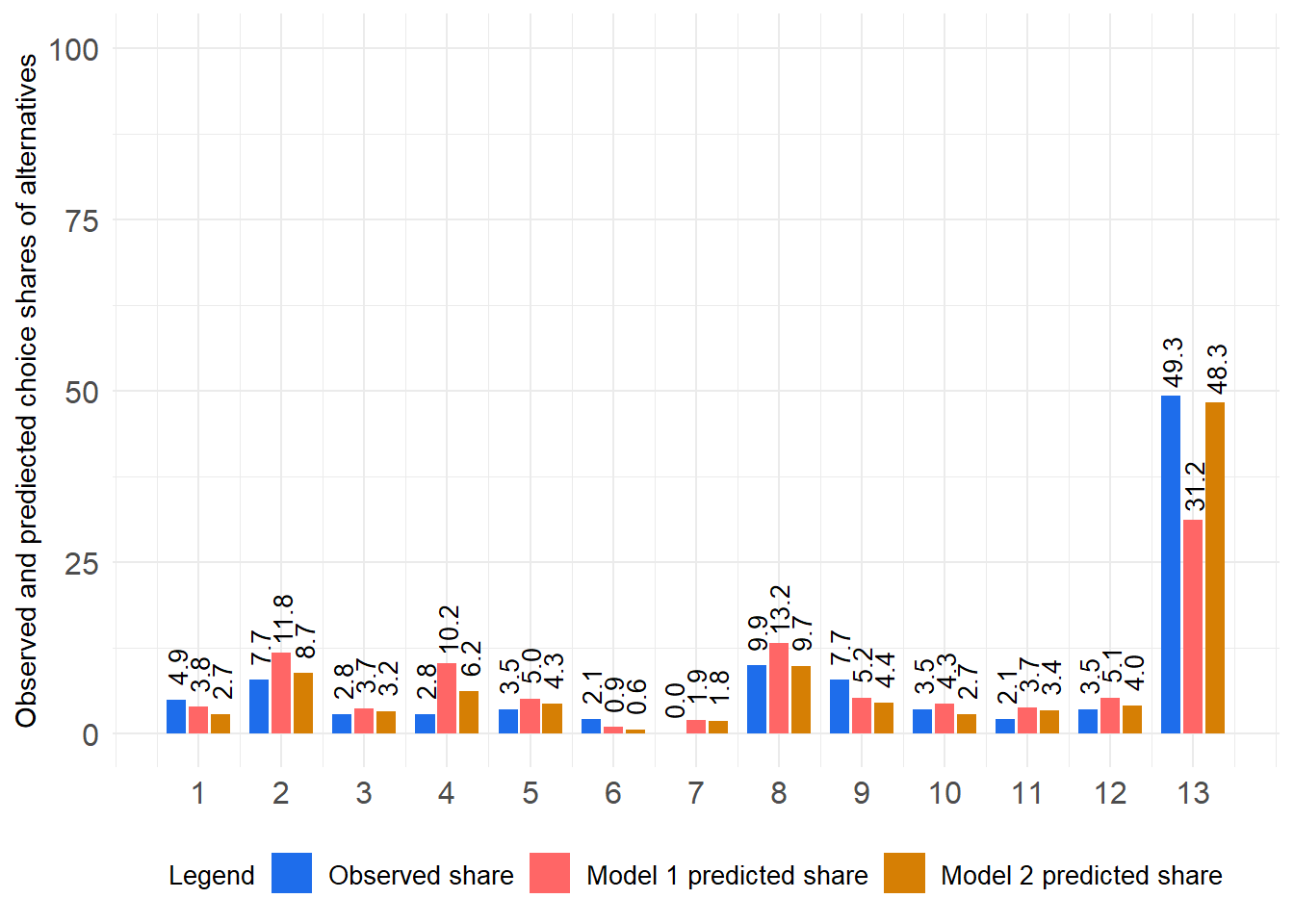
Then, we focus on the comparison of hit probabilities between both models. We first call for the non-parametric comparison based on the Wilcoxon signed-rank test and then for the parametric comparison based on the rank-based inverse normal transformation and paired t-test.
model_comparison_results$Plot_nonparametric_MHP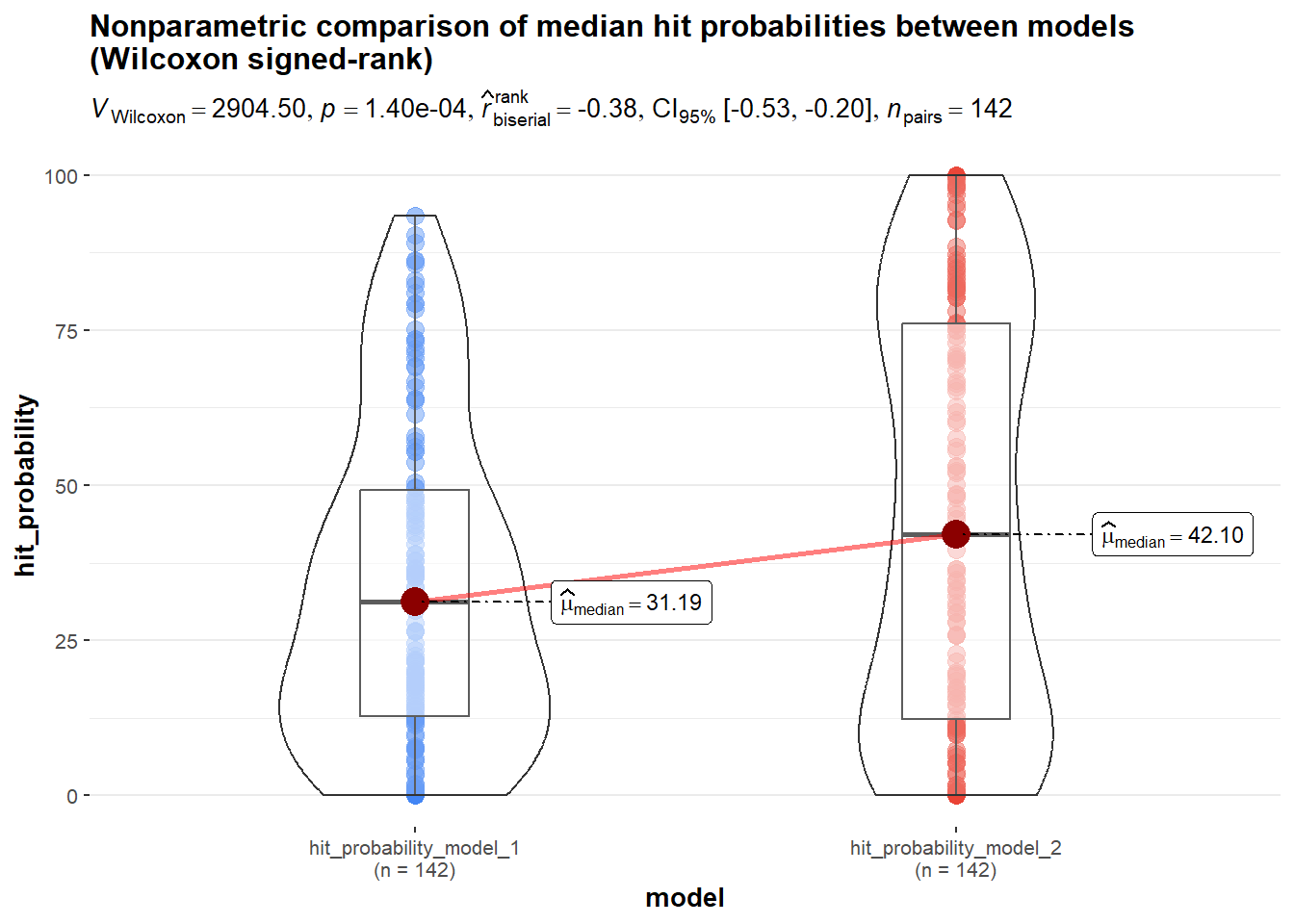
model_comparison_results$undirected_p_value_Wilcoxon_signed_rank_test_MHP[1] 0.0001401957model_comparison_results$plot_parametric_transformed_MHP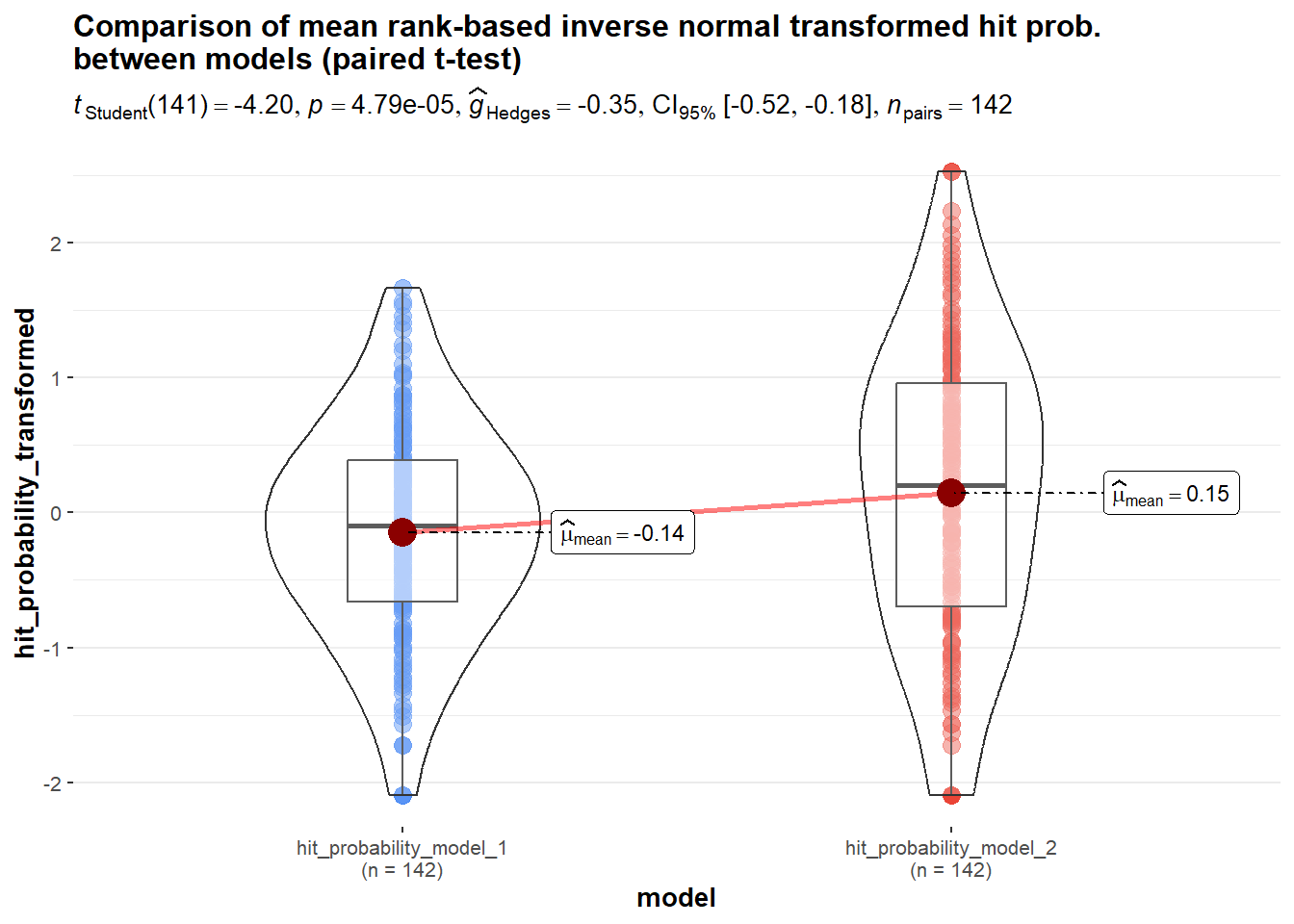
model_comparison_results$undirected_p_value_parametric_paired_t_test_transformed_MHP[1] 4.785212e-05
Note
Interpretation: As one can easily see, the output of the function provides a comprehensive summary of the comparison between both models in terms of their predictive validity, covering all the aspects discussed above.
8 List of References
Chapman, C., & Feit, E. M. (2019). R for marketing research and analytics. doi: 10.1007/978-3-030-14316-9
Cohen, J. (1968). Weighted kappa: Nominal scale agreement provision for scaled disagreement or partial credit. Psychological Bulletin, 70(4), 213–220. doi: 10.1037/h0026256
Ding, M., Grewal, R., & Liechty, J. C. (2005). Incentive-aligned conjoint analysis. Journal of Marketing Research, 42(1), 67–82. doi: 10.1509/jmkr.42.1.67.56890
Dong, S., Ding, M., & Huber, J. C. (2010). A simple mechanism to incentive-align conjoint experiments. International Journal of Research in Marketing, 27(1), 25–32. doi: 10.1016/j.ijresmar.2009.09.004
Field, A. P., Miles, J., & Field, Z. (2012). Discovering statistics using r. London; Thousand Oaks, Calif: Sage.
Gabry, J., & Mahr, T. (2025). Bayesplot: Plotting for bayesian models. Retrieved from https://mc-stan.org/bayesplot/
Gamer, M., Lemon, J., & Singh, I. F. P. (2019). Irr: Various coefficients of interrater reliability and agreement. doi: 10.32614/CRAN.package.irr
Gelman, A., Carlin, J. B., Stern, H. S., Dunson, D. B., Vehtari, A., & Rubin, D. B. (2014). Bayesian data analysis (Third edition). Boca Raton; London; New York: CRC Press Taylor and Francis Group.
Kruschke, J. K. (2015). Doing bayesian data analysis: A tutorial with r, JAGS, and stan (2. ed.). doi: 10.1016/c2012-0-00477-2
Landis, J. R., & Koch, G. G. (1977). The measurement of observer agreement for categorical data. Biometrics, 33(1), 159–174. doi: 10.2307/2529310
Lichters, M. (2024). Marketing methods and analysis: R examples used during market research lectures. doi: 10.24352/UB.OVGU-2024-085
Liu, Q., & Tang, Y. (2015). Construction of heterogeneous conjoint choice designs: A new approach. Marketing Science, 34(3), 346–366. doi: 10.1287/mksc.2014.0897
Makowski, D., Ben-Shachar, M. S., & Lüdecke, D. (2019). bayestestR: Describing effects and their uncertainty, existence and significance within the bayesian framework. 4, 1541. doi: 10.21105/joss.01541
McCaw, Z. (2023). RNOmni: Rank normal transformation omnibus test. doi: 10.32614/CRAN.package.RNOmni
Orme, B. K., & Chrzan, K. (2021). Becoming an expert in conjoint analysis: Choice modeling for pros (2nd ed.). Provo, UT: Sawtooth Software, Inc.; Sawtooth Software, Inc.
Patil, I. (2021). Visualizations with statistical details: The ’ggstatsplot’ approach. Journal of Open Source Software, 6(61), 3167. doi: 10.21105/joss.03167
Revelle, W. (2026). Psych: Procedures for psychological, psychometric, and personality research. Retrieved from https://CRAN.R-project.org/package=psych
Rinker, T. W., & Kurkiewicz, D. (2018). Pacman: Package management for r. Retrieved from http://github.com/trinker/pacman
Sablotny-Wackershauser, V., Lichters, M., Guhl, D., Bengart, P., & Vogt, B. (2024). Crossing incentive alignment and adaptive designs in choice-based conjoint: A fruitful endeavor. Journal of the Academy of Marketing Science. doi: 10.1007/s11747-023-00997-5
Schramm, J. B. (2025). Incentive alignment in conjoint analysis: A meta-analysis on predictive validity. Marketing Letters, 36, 533–546. doi: 10.1007/s11002-025-09764-8
Schramm, J. B., & Lichters, M. (2024). Incentive alignment in anchored MaxDiff yields superior predictive validity. Marketing Letters, 36(1), 1–16. doi: 10.1007/s11002-023-09714-2
Schramm, J. B., Lichters, M., & Guhl, D. (2025). Anchoring methods for MaxDiff and their predictive validity in product choice. SSRN Electronic Journal. doi: 10.2139/ssrn.5674983
Voleti, S., Srinivasan, V., & Ghosh, P. (2017). An approach to improve the predictive power of choice-based conjoint analysis. International Journal of Research in Marketing, 34(2), 325–335. doi: 10.1016/j.ijresmar.2016.08.007
Wickham, H. (2016). ggplot2: Elegant graphics for data analysis. Retrieved from https://ggplot2.tidyverse.org
Wickham, H., Averick, M., Bryan, J., Chang, W., McGowan, L. D., François, R., … Yutani, H. (2019). Welcome to the tidyverse. 4, 1686. doi: 10.21105/joss.01686
Wickham, H., & Bryan, J. (2025). Readxl: Read excel files. doi: 10.32614/CRAN.package.readxl
Wickham, H., François, R., Henry, L., Müller, K., & Vaughan, D. (2026). Dplyr: A grammar of data manipulation. doi: 10.32614/CRAN.package.dplyr
Wickham, H., Vaughan, D., & Girlich, M. (2025). Tidyr: Tidy messy data. doi: 10.32614/CRAN.package.tidyr
Footnotes
(Bayesian experts recently propose to use of 89% intervals, which are deemed to be more stable than 95% intervals (Kruschke, 2015). Moreover, 89% indicates the arbitrariness of interval limits.)↩︎
Reuse
CC BY-NC-ND 4.0, see https://creativecommons.org/licenses/by-nc-nd/4.0/
(View License)
Copyright
Please cite the author Marcel Lichters!
Citation
BibTeX citation:
@unpublished{lichters2026,
  author = {Lichters, Marcel},
  title = {Marketing {Methods} and {Analysis:} {R} {Examples} Used
    During {Market} {Research} {Lectures}},
  date = {2026-06-02},
  url = {https://pub.ww.ovgu.de/lichters/ocr/OCR_R_Lecture_Examples_ACBC_Quarto.html},
  doi = {https://doi.org/10.24352/UB.OVGU-2026-053},
  langid = {en},
  abstract = {This script demonstrates R workflows for Adaptive
    Choice-Based Conjoint (ACBC) analysis using a PlayStation 4 bundle
    study (n = 142). It derives quantile-based price breakpoints for
    piecewise price functions and relates them to hierarchical Bayes
    (HB) utilities. It analyzes post-burn-in posterior draws of the
    upper-level means (Alpha) to compute highest density intervals,
    posterior probabilities, and tests of differences in part worths,
    total utilities, and relative importances. Predictive validity is
    assessed on holdout tasks via hit rate, MAE, MedAE, RMSE, Cohen’s
    kappa, and mean hit probability. Two HB models are compared with
    exact McNemar/binomial and Wilcoxon signed-rank tests. Reusable R
    functions automate the validation.}
}
For attribution, please cite this work as:
Lichters, M. (2026). Marketing Methods and Analysis: R Examples used
during Market Research Lectures. doi: https://doi.org/10.24352/UB.OVGU-2026-053